SAML vs OAuth is a common comparison, but the two are not really competing for the same job. SAML is widely used to help users sign in to enterprise applications, while OAuth is built to let applications gain controlled access to protected resources and APIs.
The confusion usually starts when terms such as authentication, authorization, SSO, tokens, and identity are used together. Once you separate those roles, the choice becomes much easier to understand.
So, what actually separates SAML from OAuth, and when should you use each one? Let’s break it down.
SAML vs OAuth: What is the Difference?
The short answer is SAML and OAuth do different jobs. SAML 2.0 is mainly used for enterprise sign-in and identity federation. It lets an identity provider send trusted information about a user to an application through a SAML assertion.
OAuth 2.0 is built for authorization. It lets an application get limited access to a protected resource, such as an API, without asking for the user’s password.
This is where the confusion often starts. SAML and OAuth are sometimes treated as competing authentication protocols, but they are not direct substitutes. If employees need to sign in to a business application through their company’s identity provider, SAML can be a good fit. If an application needs permission to access an API or a user’s data, OAuth is usually the better fit.
In simple terms:
- SAML: “This user has signed in, and here is trusted information about them.”
- OAuth: “This application has permission to access this resource.”
That basic difference makes it much easier to understand when each technology should be used.
| Factor | SAML 2.0 | OAuth 2.0 |
| Main purpose | Helps applications verify a user’s identity and share identity details | Lets an application get limited access to a protected resource |
| Main artifact | SAML assertion | Access token |
| Common use | Enterprise SSO and federated sign-in | API access and delegated access to resources |
| Data format | XML-based | Token format can vary by implementation |
| Main question | “Who is this user, and what information should the application receive?” | “What is this application allowed to access?” |
| Typical parties | Identity provider (IdP) and service provider (SP) | Client, authorization server, and resource server |
| Key strength | Works well for enterprise identity and SSO | Supports controlled, scoped access to protected resources |
There is some overlap between the two. SAML can also carry user attributes and authorization details, so it is not only about authentication. The main difference is that SAML is commonly used to share identity information, while OAuth gives applications limited access to protected resources.
In simple terms, SAML helps an application understand who a user is, while OAuth helps determine what an application can access.
For a deeper look at how SAML handles authentication, see the SAML Authentication.
Why Do People Compare SAML vs OAuth?
The comparison usually starts because both technologies appear in identity and access management projects. Both can involve a user, an application, an identity system, and a set of permissions, so it is easy to assume that one can simply replace the other.
The confusion grows when vendors use broad terms such as “authentication,” “authorization,” “SSO,” and “access” without explaining which protocol is handling each step.
A useful way to separate them is to look at the resource being protected.
With SAML, the application typically needs trusted information about a user who has authenticated with an identity provider. With OAuth, a client typically needs a credential that lets it access a protected resource within a defined scope.
OAuth’s original specification was specifically designed to avoid giving a third-party application the user’s credentials when accessing protected resources.
This is why asking only “Which protocol is better?” leads to the wrong decision. A better question is: What does the application need to receive or do after the user or system has been authorized?
If the answer is enterprise sign-in and identity information, SAML may be appropriate. If the answer is permission to call an API or access a resource, OAuth is usually the more relevant framework.
What Does SAML Do?

SAML, or Security Assertion Markup Language, lets two systems securely share information about a user. It uses XML-based assertions to communicate details such as whether a user has been authenticated and, when needed, attributes linked to that user. OASIS defines SAML 2.0 as a framework for exchanging authentication, attribute, and authorization information.
Here’s a common example. An employee wants to open a business application, but their company manages employee logins through a separate identity provider (IdP). SAML lets that identity provider tell the application, or service provider (SP), that the user has successfully authenticated.
The basic flow looks like this:
- The user opens an enterprise application.
- The application sends the user to the company’s identity provider.
- The identity provider authenticates the user.
- The identity provider creates a SAML assertion with relevant security information.
- The application checks the assertion to make sure it is valid and trusted.
- The application signs the user in and creates a session.
The key idea is cross-domain identity exchange. The identity provider and application may belong to different systems or organizations, but they can still exchange trusted identity information through SAML.
That is why SAML is common in enterprise SSO. It helps business applications work with an organization’s existing identity infrastructure without requiring the application to manage every user’s login itself.
What Does OAuth Do?
OAuth 2.0 is an authorization framework. In simple terms, it lets an application get permission to access a protected resource without asking for the user’s password. It is not, by itself, a general-purpose authentication protocol.
Here’s an easy example. Say a calendar app wants to add events to your Google Calendar. Instead of giving the app your Google password, you can permit it to access your calendar through an OAuth flow.
The process usually looks like this:
- You grant permission to the application.
- The authorization server checks that request.
- The application receives an access token.
- The application sends that token when it requests your data.
- The resource server checks the token and its allowed scope before giving access.
Think of the access token as a permission slip. It tells the resource server what the application is allowed to access, without giving the application your password.
That is where scopes come in. A scope sets the level of access an application can request. For example, an API might allow an app to read calendar events but not create or delete them.
This makes OAuth useful for API access, third-party integrations, and apps that need controlled access to another service.
One important point: an OAuth access token tells a system what a client can access. It does not, by itself, prove who the user is. When an application also needs user authentication, a separate identity layer such as OpenID Connect may be used.
How Do SAML and OAuth Work Differently?
The easiest way to understand SAML vs OAuth is to look at what each one does during a request. The steps are different because the protocols solve different problems.
A Typical SAML Flow:
A SAML setup usually has two key roles: an identity provider (IdP) and a service provider (SP).
The IdP checks the user’s identity. If the user is allowed to sign in, the IdP sends a signed SAML assertion to the SP. The assertion carries information the application can use to create the user’s session.
The service provider then checks the assertion before allowing the user into the application. It should verify details such as the issuer, signature, audience, and other required conditions.
A Typical OAuth Flow:
OAuth has a different set of roles: a client, authorization server, resource owner, and resource server.
The client asks for permission to access a protected resource. If that permission is granted, the authorization server issues an access token. The client then sends that token when it requests the protected resource, often through an API.
The resource server checks the access token before returning the requested data or performing the requested action.
SAML vs OAuth: What Changes?
| Question | SAML | OAuth |
| What is exchanged? | A SAML assertion | An access token |
| Main purpose | Share trusted identity and security information | Grant controlled access to a resource |
| Typical use | Enterprise application SSO | APIs and third-party access |
| Who checks it? | The service provider | The resource server |
| Main question | “Is this assertion valid for this application?” | “Does this token allow this client to access this resource?” |
So, the key difference is not simply the format of the data they use. SAML is commonly used to establish identity and a user session, while OAuth is used to grant a client permission to access a protected resource.
That difference is what should drive the technology choice. If the goal is enterprise SSO, SAML may be the better fit. If the goal is controlled API or resource access, OAuth is usually the more relevant choice.
SAML Assertions vs OAuth Access Tokens: What Changes?
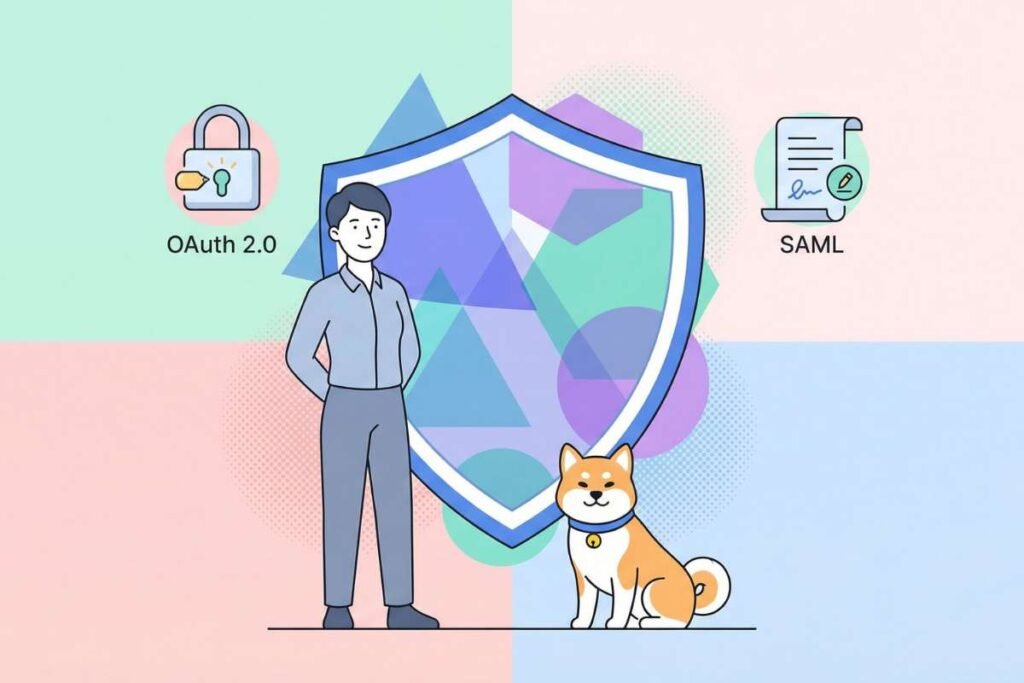
When comparing SAML vs OAuth, one of the clearest differences is how each handles security information. At first glance, a SAML assertion and an OAuth access token may look similar. Both carry security information between systems, but they serve different purposes.
A SAML assertion is a structured statement from a trusted identity provider. It can tell an application that a user has authenticated and can include details such as the user’s attributes or roles. SAML uses XML to structure this information.
An OAuth access token has a different job. It represents permission to access a protected resource, such as an API. The client sends the token when it makes a request, and the resource server checks whether that token allows the requested access.
Here’s the difference at a glance:
| Feature | SAML Assertion | OAuth Access Token |
| Main purpose | Share identity and authentication information | Grant access to a protected resource |
| Format | XML-based assertion | Depends on the implementation |
| May contain | Authentication details and user attributes | Scopes, permissions, and other authorization data |
| Usually used by | Service provider or application | API or resource server |
| Typical use | Enterprise SSO | API and delegated access |
| What needs checking? | Issuer, signature, audience, recipient, and time limits | Token validity, issuer, audience, scope and lifetime |
There’s another important point: OAuth does not require one specific access-token format. An access token might be a reference value that the resource server looks up, or it might contain information the server can validate directly. The OAuth framework leaves that choice to the implementation.
Access tokens also need strong protection because they act as credentials. A stolen token could give someone access to the resources allowed by that token. The resource server should therefore validate the token and check that it grants the requested permission.
When Should You Use SAML for Enterprise Applications?
SAML is a good choice when an application needs to work with an enterprise identity system. This is common when employees or customers already use an identity provider (IdP) to sign in to business applications.
SAML can be a good fit when:
- An enterprise customer requires SAML-based SSO.
- The customer’s identity system already supports SAML.
- An application needs federated sign-in between different organizations.
- The application needs trusted user details, such as a name, email address, or role.
- A customer or procurement team requires SAML support.
But that does not mean SAML is the right choice for every new application. The best option depends on how the application works, what its customers need, and which identity systems it must support.
For SaaS providers, this matters during customer onboarding. An enterprise customer may already have SAML in place and expect a new application to support it. In that case, adding SAML support can be a practical requirement, not just a technical preference.
In simple terms, use SAML when the main need is enterprise sign-in and identity federation, especially when customers already rely on SAML.
For more on how this works, see the SAML Single Sign-On.
When is OAuth the Better Choice for APIs and Resource Access?
OAuth is a good fit when an application needs controlled access to a protected resource, such as an API or a user’s data.
OAuth is often used when:
- A third-party app needs access to a user’s data.
- An app needs to call a protected API.
- Access needs to be limited through scopes.
- Users or admins need to approve specific permissions.
- Different apps or clients need different levels of access.
- A service needs machine-to-machine authorization.
Why Do OAuth Scopes Matter:
Scopes define what an application is allowed to access. An API might have separate scopes for reading and changing data. The client can then request only the permissions it needs.
For example, the Google Calendar API provides calendar.events.readonly for viewing calendar events and calendar.events for viewing and editing events. An application that only needs to display a user’s events can request the read-only scope instead of requesting permission to modify them. The API can then use the granted scope to determine whether the requested operation is permitted.
This gives teams a practical way to apply least-privilege access: an application does not need to receive more access than its task requires.
SAML vs OAuth: Which Is More Secure?
So, which is more secure: SAML or OAuth? There is no simple winner. Both have strong security features, but both can become risky when they are not set up or checked correctly.
The main difference is what each protocol needs to protect.
Also read: SAML Federation vs OAuth vs OpenID Connect: What Do You Need?
How Does SAML Handle Security:
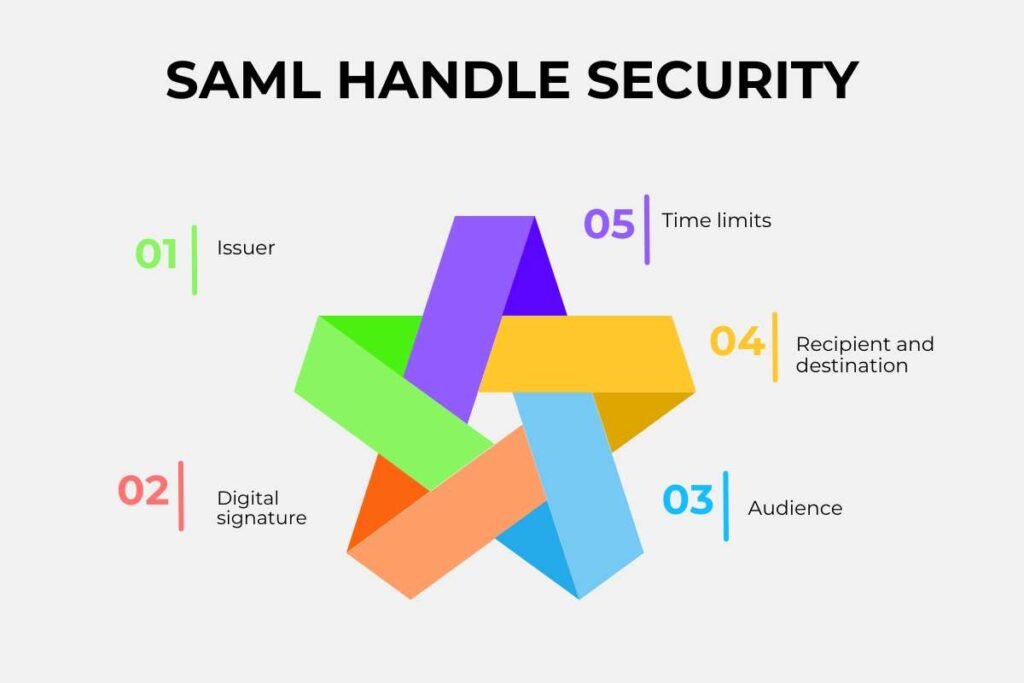
With SAML, an application receives a security statement, called an assertion, from a trusted identity provider. The application must check that the statement is real and that it was created for that application.
Key checks include:
- Issuer: Did the trusted identity provider send it?
- Digital signature: Has the statement been changed?
- Audience: Was it meant for this application?
- Recipient and destination: Is it being sent to the right place?
- Time limits: Is the statement still valid?
These checks help stop attackers from using a fake, changed, expired, or wrongly sent assertion.
SAML also needs protection against replay attacks. In a replay attack, an attacker tries to reuse a valid assertion that was already issued. OWASP also warns about XML signature-wrapping attacks, where an attacker tries to manipulate the structure of a SAML message without breaking its original signature.
NIST’s current federation guidance also calls for controls such as audience restriction and replay protection when relying parties process federation assertions.
How Does OAuth Handle Security:
OAuth has a different security focus because it protects the process used to grant access and the tokens that carry that access.
The current OAuth security guidance, RFC 9700, recommends strict redirect-URI matching and requires public clients using the authorization code flow to use PKCE (Proof Key for Code Exchange). PKCE helps protect the authorization code if it is intercepted during the flow.
OAuth also requires careful handling of access tokens. If an attacker gets a valid token, they may be able to use the access it provides. That is why factors such as token lifetime, scope, storage, validation, and protection against reuse all matter.
So, which one is more secure?
The answer depends less on the protocol name and more on how it is set up and used.
A SAML system needs strong checks on its assertions and careful management of trust between the identity provider and service provider. An OAuth system needs strong protection for its access process, applications, and access tokens.
In both cases, security comes down to using the right protections for the protocol and the risks in the system.
The better question is not, “Which is more secure?” It is:
“What does this system need to protect, and are we using the right security controls to protect it?”
Can SAML and OAuth Be Used Together?

Yes. SAML and OAuth can work together because they solve different access needs.
For example, an enterprise SaaS application might use SAML for employee sign-in through the customer’s identity provider. The same application could then use OAuth to access a separate API with the right permissions.
The setup could look like this:
Enterprise identity → SAML → SaaS application
SaaS application → OAuth → Protected API
In this setup, SAML handles the user’s sign-in, while OAuth handles delegated access to the API. There is no conflict because each protocol has a different job.
Still, using both should be a clear design choice. Each one needs its own configuration, validation, and security controls. Adding both when only one is needed can make the system harder to manage.
One more point is important: OAuth 2.0 is not an authentication protocol. If an application needs modern user authentication on top of OAuth, OpenID Connect (OIDC) is the technology to look at. OIDC adds an identity layer to OAuth 2.0.
SAML vs OAuth: How Do You Choose the Right One?
Start with the business and technical requirements, not the protocol name.
Use this decision framework:
| If your primary requirement is… | More relevant choice |
| Enterprise application SSO | SAML |
| Federated identity between an enterprise identity system and an application | SAML |
| Existing enterprise customers require SAML | SAML |
| Delegated access to a protected API | OAuth |
| Giving an application limited access to a user’s resource | OAuth |
| Permission-based API access using scopes | OAuth |
| A combination of enterprise sign-in and API authorization | SAML + OAuth may both be appropriate |
Before choosing, ask these five questions:
- What needs protection?
Is the primary concern an application session, an API, user data, or another protected resource? - What does the application need to receive?
Does it need trusted identity and attribute information, or does it need an access credential? - Who controls the identity system?
An enterprise customer may already have a SAML-based setup that the application must support. - What clients and resources are involved?
APIs, mobile clients, and third-party applications often create authorization requirements that OAuth is designed to address. - What protocols do customers or partners require?
Technical fit matters, but compatibility with an organization’s existing identity infrastructure can determine the practical choice.
For SaaS providers, this can also affect customer onboarding. A protocol that fits the product architecture but does not meet the identity requirements of target customers may create additional integration work later.
Conclusion
When it comes to SAML vs OAuth, there is no single winner. The right choice depends on what your application needs to do.
SAML is a strong fit for enterprise SSO and identity federation, while OAuth is designed for delegated access to APIs and protected resources. In some systems, both can work together, with each handling a different part of the access flow.
The key is to start with the requirement, not the protocol. Ask whether you need to establish a user’s identity, enable enterprise sign-in, or give an application controlled access to a resource. Once that is clear, choosing between SAML, OAuth, or using both becomes much simpler.
FAQs
1. Is SAML suitable for mobile applications?
SAML is mainly used for enterprise browser-based SSO. OAuth is generally a better fit for mobile apps and API-based access.
2. Which is easier to integrate with an existing enterprise identity provider?
It depends on the provider and its supported protocols. If the organization already uses SAML for enterprise applications, a SAML integration may be simpler.
3. What should developers consider before choosing SAML vs OAuth?
Consider the application’s access needs, identity provider, client types, security requirements, and the resources that need protection.
4. How do SAML and OAuth affect application maintenance?
SAML may require managing certificates, metadata, and identity-provider settings. OAuth requires ongoing management of clients, scopes, tokens, and authorization policies.