A SAML identity provider is a safe login server that checks who you are and sends digital passes to work apps. It puts all logins in one place, stops password tiredness, and makes single sign-on easy. Read on to learn how it is built, how logins travel, and how to keep your system safe.
What if your company’s biggest security risk isn’t a weak firewall, but how it checks who is logging in?
With hackers stealing more than 5.3 billion passwords, depending on separate passwords everywhere is a massive danger. Setting up a SAML Identity Provider helps organizations lock down logins, stop password fatigue, and manage user access from one safe place.
Let’s see how this tool works and why it keeps your systems secure.
What is a SAML Identity Provider?
It is a login server that checks who people are and sends secure digital passes to outside apps. Instead of letting every cloud program keep and check its own passwords, the IdP acts as the main security check for company logins.
When someone tries to sign in to a work app, the app sends them to the IdP. The IdP asks for their password, checks it against the company user list, and tells the app that the person is real. This setup means your password never gets stored on other servers.
Why Do SAML Identity Providers Matter?
Putting all logins in one place changes how companies lower risks, save time, and follow safety rules. Without an IdP, workers use many different passwords, which leads to risky habits and using unapproved apps.
Also, the Verizon Data Breach Investigations Report shows that stolen or weak passwords cause most security breaches, often because multi-factor login is missing. Using a central login system lets security teams block access right away. This means when a worker leaves the company, you can cut their access to all linked work tools instantly.
Identity Provider (IdP) vs. Service Provider (SP): Key Differences
When you set up a single sign-on, it helps to understand how the work is split between the system that checks your identity and the app you want to use.
The Identity Provider (IdP) acts as the main gatekeeper. It holds your user accounts, checks your passwords, and proves who you are. Once it verifies you, it creates a secure digital pass confirming your identity.
The SAML Service Provider is the actual application you want to open, like your email or HR software. The SP does not store your password. Instead, it reads the digital pass from the IdP, trusts it, and lets you inside without making you log in again.
The table below compares these two parts so you can review their differences at a glance:
| Feature | Identity Provider (IdP) | Service Provider (SP) |
|---|---|---|
| Primary Role | Checks users and issues a secure digital pass. | Accepts the pass and lets you open the app. |
| Password Storage | Holds user accounts, passwords, and security rules. | Does not store user passwords or account lists. |
| Trust Direction | Sends the security pass outward to apps. | Relies entirely on the IdP’s digital signature to trust users. |
| Examples | Microsoft Entra ID, Okta, PingFederate, Keycloak. | Salesforce, Zoom, Workday, GitHub, Jira. |
What Are the Functions of a SAML Identity Provider?

When a worker logs into an app using single sign-on, a lot happens inside the system in milliseconds. A modern IdP handles four main internal tasks during every login:
1. Credential Validation:
The IdP checks your password or security key against a secure user database (like Active Directory) to confirm who you are.
2. Attribute Mapping:
It grabs your profile details such as your email and job role and formats them into standard claims that external apps can read.
3. Cryptographic Signing:
The IdP uses a secure digital key to stamp your login pass, proving to the app that the message is authentic and untampered with.
4. Session Management:
It tracks your active session so you do not have to log in again every time you open a new work tool, while managing automatic timeouts when you step away.
How Does a SAML Identity Provider Power Single Sign-On (SSO)?
The main goal of setting up an IdP is to give workers a smooth Single Sign-On (SSO) experience across every platform they use. Instead of logging into email, HR software, and chat tools separately all day long, workers sign in just once in the morning.
The typical daily workflow looks like this:
- Morning Login: The user enters their credentials once into the IdP portal, which sets up a secure browser session cookie.
- App Verification: When the user opens a new work tool later in the day, the application checks back with the IdP for an active session.
- Instant Entry: Because the system already verified the user, it grants access right away without asking for a password again.
This unified approach helps IT and security teams in two major ways:
- Fewer Helpdesk Tickets: Workers stop forgetting multiple passwords, which drastically cuts down on frustrating reset requests.
- Smaller Attack Surface: Centralizing logins means fewer systems store raw passwords, leaving hackers with fewer entry points to target.
How Users Log In Using SAML Identity Providers?
The authentication flow maps out the exact travel path of a login request across the network. This journey typically happens in one of two ways:
1. Service Provider (SP) Initiated Flow
This happens when you try to open a work tool directly without logging into your portal first.
Step 1: You open an app directly, such as Salesforce or Zoom.
Step 2: The app sees you are not logged in, so it generates a formal SAML request.
Step 3: The app automatically redirects your web browser to your company’s IdP login page.
Step 4: You enter your credentials and complete your multi-factor verification on the IdP screen.
Step 5: The IdP packages your details into a signed digital token and sends it back through your web browser to the app.
Step 6: The app reads the signature, confirms it is valid, and opens your account.
2. Identity Provider (IdP) Initiated Flow
This happens when you start your workday directly from your central login dashboard.
Step 1: You log straight into your company’s central IdP dashboard first.
Step 2: You click an app icon (called a chiclet) for the tool you want to use.
Step 3: The IdP creates the signed digital token immediately and sends it straight to the target app via your browser.
Step 4: The app accepts the token and logs you in instantly without asking for a password.
What Are the Key Components of a SAML IdP Architecture?
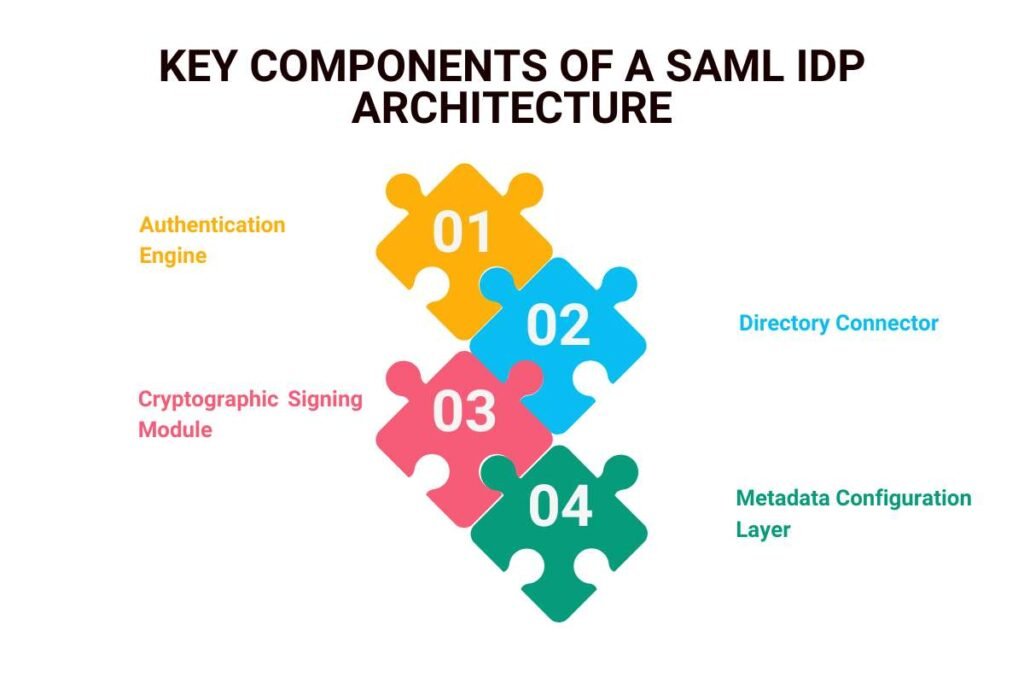
Behind every fast, secure login is a technical setup built from specific moving parts. Together, these pieces check who you are and securely pass your details to your apps.
The core architecture relies on four main components:
1. Authentication Engine:
This part checks your password, prompts you for multi-factor authentication (MFA), and enforces company security rules.
2. Directory Connector:
This links the IdP to your company’s user directory (such as Active Directory or LDAP) to pull up real-time employee records.
3. Cryptographic Signing Module:
This uses a private key to stamp a digital signature onto your login pass, ensuring no one can tamper with it along the way.
4. Metadata Configuration Layer:
This uses special XML files to share key technical details like web addresses, unique app names, and public security keys, so the IdP and apps know how to talk safely to each other.
These systems work together in seconds to turn your raw directory profile into a trusted set of digital claims that outside apps can accept without question.
What Are the Different Types of SAML Identity Providers?
Companies set up identity providers in a few different ways, depending on their computer systems, budget, and security rules.
1. Cloud-Native Identity Providers
Cloud-native identity providers are managed entirely in the cloud by a software vendor. They scale up easily as your company adds more workers and handle all software updates automatically without requiring manual IT work on your end.
2. On-Premises Identity Providers
On-premises identity providers are hosted directly on your own local company servers and hardware. They give your IT team total control over your data and security settings, making them ideal for groups with strict data rules.
3. Hybrid Federation
Hybrid setups bridge the gap between old and new systems. They connect your local office user directories to modern cloud apps using secure sync tools, helping teams that are moving to the cloud in phases.
The table below compares these three options so you can review them at a glance:
| Deployment Type | Main Features | Best Suited For |
| Cloud-Native IdP | Managed in the cloud, scales easily, updates automatically (like Okta or Microsoft Entra ID). | Modern businesses that want low setup and maintenance work. |
| On-Premises IdP | Hosted on your own local servers, giving you total control and strict security alignment. | Highly regulated groups that must keep data on local hardware or air-gapped systems. |
| Hybrid Federation | Connects local user directories to cloud apps using secure sync tools. | Businesses that are slowly moving from old local systems to the cloud. |
What Security Features Protect Modern SAML Identity Providers?
Modern identity providers use advanced security tools to block automated hacker bots and credential stuffing attacks. These safety layers include risk checks that look for unusual sign-in patterns, location tracking, and strict multi-factor authentication (MFA) that resists phishing.
Also, according to NIST digital identity guidelines, modern security frameworks focus on careful account management and physical security keys to raise trust levels during logins. Because of these built-in safety features, a stolen password alone is no longer enough for a hacker to break into your company apps.
What Are the Common Security Risks and How Can You Stop Them?

Because an Identity Provider acts as the master key for all your corporate apps, hackers treat it as a high-value target. If an attacker breaks into your IdP, they gain instant access to every connected app at the same time.
To keep your central login system safe, security teams only need to focus on two major risk areas:
1) XML Token Manipulation:
Hackers try to trick the system by sneaking fake data into security passes while leaving the digital signature intact. You can stop this by using strict XML parser settings and making sure your apps verify incoming data paths.
2) Compromised Admin Accounts:
If an attacker steals an administrator password, they take over the entire identity system. You can block this threat entirely by protecting all admin accounts with phishing-resistant multi-factor authentication (MFA) and limiting staff permissions.
How to Configure a Secure SAML Identity Provider?
Setting up a secure identity provider requires building trust before you connect any live apps. IT teams should follow a clear, step-by-step plan to keep data safe:
Step 1: Exchange metadata safely. Make sure the IdP and the app check each other’s web addresses and unique IDs.
Step 2: Map user details carefully. Only share the specific user info that the app actually needs to function.
Step 3: Block token tricks. Set strict rules on who can read the login pass and where it can go to stop hackers from injecting fake data.
Step 4: Automate updates and test first. Set up automatic security certificate updates and test your login flow in a test environment before launching it live.
Conclusion
A SAML Identity Provider acts as the backbone of safe company logins. By keeping all logins in one secure place and using encrypted digital passes, businesses can protect their data from growing password threats.
Learning the basics of Security Assertion Markup Language keeps your company logins safe and ready to grow.
Frequently Asked Questions
1. Can an organization use multiple SAML Identity Providers?
Yes, many large enterprises deploy multiple IdPs to handle separate business units, corporate acquisitions, or distinct customer versus employee directories. However, managing multiple IdPs increases architectural complexity and requires careful federation governance.
2. What happens if a SAML Identity Provider goes offline?
If the IdP experiences an outage, users cannot authenticate into new sessions across connected applications. Organizations mitigate this risk by utilizing highly available, geo-redundant cloud-native IdP architectures backed by strong uptime service-level agreements.
3. How does user provisioning work alongside a SAML IdP?
While SAML handles runtime authentication and authorization assertions, automated user provisioning is typically handled via the System for Cross-domain Identity Management (SCIM) protocol. This ensures user accounts are automatically created, updated, or deactivated across apps.
4. Are SAML assertions encrypted by default?
Not always; standard SAML assertions are digitally signed for integrity but often transmitted in plain XML unless explicit encryption is configured. Security best practices recommend encrypting sensitive assertion payloads between the IdP and the Service Provider.