SAML Authentication is a security standard that lets your team use one login for all your business tools. Instead of apps storing separate passwords, they check a central system to verify your identity. This removes password fatigue and helps you manage who accesses your company data. Read the full guide to learn how to set up your own secure login system.
Did you know that stolen passwords are involved in a large share of data breaches? As teams use more apps, keeping up with hundreds of different passwords has become a huge headache.
SAML Authentication fixes this by connecting all your logins to one secure source. It closes off weak spots, stops hackers, and makes logging in easier for everyone. Then let’s see how it works and why it is the best way to secure your business today.
What is SAML Authentication?
SAML, or Security Assertion Markup Language, is a standard used to exchange identity data between two parties. It is built on XML, a language that structures data so different systems can talk to each other.
To understand how it works, you need to know the four key players involved in every SAML setup:
1. Principal (The User):
This is you, the employee or team member trying to access an application. You are the one initiating the request to log in.
2. Identity Provider (IdP):
This is your central source of truth. It is the system that holds your account details and verifies who you are. Common examples include Microsoft Entra ID or Okta.
3. Service Provider (SP):
This is the application you want to access, such as your email, project management tool, or HR software.
4. SAML Assertion:
This is the message created by the IdP. It is a secure XML document that tells the Service Provider, ‘Yes, this user is who they claim to be, and they have permission to access this app.’
Instead of the application asking you for a password, it asks the IdP to confirm who you are. This keeps your login data safe and contained within one secure system.
Why is SAML Authentication Important?
Identity-based attacks are now the primary way hackers get into business networks. According to the 2026 Annual Threat Dynamics report from PwC, attackers choose to log in rather than break in, often using stolen credentials to gain access.
The Identity and Access Management market is expanding rapidly, with industry valuations projected to reach $25.34 billion in 2026. Businesses are moving toward SAML because it solves a major security weakness: password fatigue. When employees have too many accounts, they reuse passwords, which makes it easy for attackers to steal access. By moving to a centralized identity model, you gain control over who enters your systems and when.
How Does SAML Authentication Work?

SAML creates a secure link between your application and your identity system. This allows you to log in without passing sensitive passwords across systems. The process relies on a handshake that keeps identity verification centralized.
1) The Request:
You try to access an app, like your email or project board. The app sees you are not logged in yet. It sends a request to your Identity Provider (IdP) to verify who you are.
2) Identity Verification:
The IdP checks your credentials. If you have Multi-Factor Authentication (MFA) enabled, the system prompts you for the extra code right here. By handling the login on the IdP side, the app itself never has to touch your actual password.
3) SAML Assertion Generation:
Once the IdP confirms your identity, it creates a signed XML document called an Assertion. This document acts as a digital key. Because the IdP signs this document with its own private key, the app can prove the data is authentic and has not been changed.
4) Session Establishment:
Your browser sends this signed Assertion to the app. The app checks the digital signature to ensure it came from the trusted IdP. If everything matches, the app lets you in and starts your session.
Types of SAML Authentication Flows:
While the process of verifying a user is consistent, the trigger for that process can happen in one of two ways. Understanding these two flows helps you configure your apps correctly.
SP-Initiated Flow:
This is the most common approach. It begins when a user tries to access a specific application (the Service Provider). The app recognizes the user is not logged in and automatically redirects them to your Identity Provider (IdP) to verify their identity. Once verified, the user is sent back to the app they originally wanted to access.
IdP-Initiated Flow:
In this scenario, the process starts at your central company dashboard (the Identity Provider). The user logs in to their dashboard first and clicks on an app icon. The IdP then sends the identity data directly to that application. This is frequently used for internal company portals where employees start their day at a single home hub.
Understanding SAML Assertions:
The SAML Assertion is the digital passport that makes the entire exchange possible. Think of it as a secure, signed package of information that the Identity Provider creates for the Service Provider. It tells the app exactly who the user is and what they are allowed to do.
A typical assertion contains three key pieces of data:
Authentication Data:
This confirms the user is who they claim to be and notes how they logged in (e.g., using a password or Multi-Factor Authentication).
Attribute Data:
This includes specific details, such as the user’s email address, job title, or role within the organization. The app uses this to customize the user’s experience or permissions.
Authorization/Validation Data:
This includes a timestamp (so the app knows the login is recent) and a digital signature. The signature is the most important part; it acts as a tamper-proof seal, proving to the app that the information inside truly came from your trusted Identity Provider and has not been altered.
SAML Authentication And Single Sign-On: Understanding the Difference
It is common to see SAML and Single Sign-On (SSO) used interchangeably, but they serve distinct functions within your security architecture. Understanding the difference is vital for your technical planning.
- Single Sign-On (SSO) defines the user experience. It represents the ability for a user to log in once and gain access to multiple applications without re-entering credentials. It is the end state you provide for your employees.
- SAML (Security Assertion Markup Language) is the underlying protocol. It is the XML-based technical standard that enables the SSO experience. When you log in, SAML acts as the language used to securely package and exchange your identity data between your Identity Provider (the source of truth) and your Service Provider (the specific application).
In short, SSO is the outcome, a singular, unified login, while SAML is the specific standard used to execute the verification process. Not all SSO solutions use SAML, but SAML is the industry standard for creating a secure, interoperable SSO environment across different business platforms.
SAML Authentication vs. Traditional Login: The Key Differences
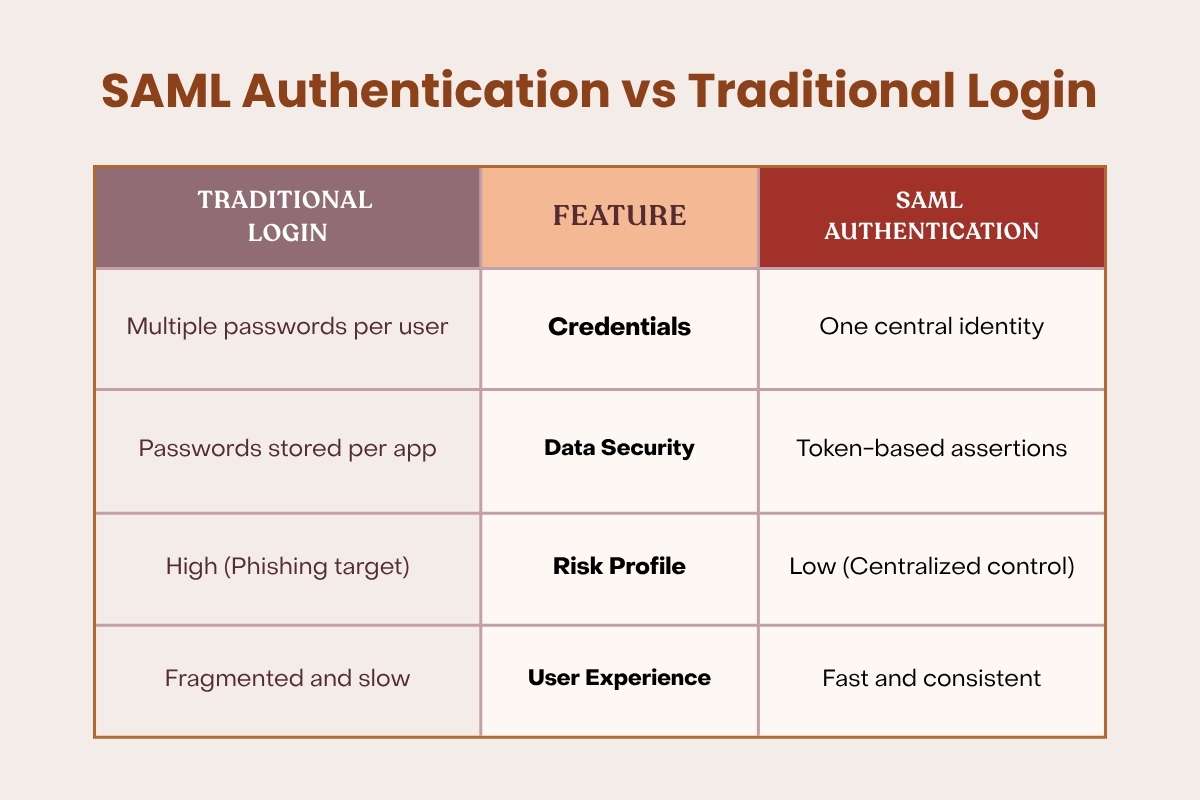
Traditional login requires you to have a unique username and password for every single tool you use. This creates multiple weak points; if one app is breached, your data is at risk.
Unified login changes this model. Instead of the app storing your password, it trusts a central Identity Provider to vouch for you. The app never holds your sensitive login data, which keeps your security profile much tighter.
| Traditional Login | Feature | SAML Authentication |
| Multiple passwords per user | Credentials | One central identity |
| Passwords stored per app | Data Security | Token-based assertions |
| High (Phishing target) | Risk Profile | Low (Centralized control) |
| Fragmented and slow | User Experience | Fast and consistent |
What Are the Security Features of SAML Authentication?
Your security relies on these five specific layers built into the process:
- Request Signing: The application signs its initial request to the identity system. This proves the request is real and prevents attackers from spoofing your software tools.
- Digital Signatures: Each identity assertion is signed with a cryptographic key. This guarantees the message is authentic and has not been altered while moving across the internet.
- Encrypted Assertions: User data inside the token is encrypted to keep it private. Only your intended application can decrypt and read the specific user attributes.
- Time-Limited Tokens: Every assertion has a short, strict lifespan. Even if an attacker steals a token, it becomes useless after a few minutes, which stops replay attacks.
- Trust Relationship: The app and identity provider exchange security certificates beforehand to establish mutual trust. If a login attempt is not signed by a known, trusted source, the system rejects it automatically.
How to Implement SAML Authentication?

Start by evaluating your current software stack. Your core business applications require a connection to a central Identity Provider (IdP), but not every tool needs the same setup.
Select an IdP that fits your company size. You do not need an enterprise suite meant for 20,000 employees if your team has 20 members. Focus on providers that offer clear support and reliable uptime, as your team’s access depends on these services.
Once you choose your IdP, map the attributes correctly. This defines which data points, such as email addresses or job roles, get passed from your IdP to your applications.
Test your setup in a sandbox environment before you roll it out to the whole company to avoid locking users out.
Best Practices for Implementation:
Proper setup ensures your security stays consistent. Follow these rules to keep your environment safe:
1. Enforce MFA:
Require Multi-Factor Authentication at the Identity Provider level. This makes your setup phishing-resistant, a standard recommendation from CISA.
2. Audit Configurations:
Check your attribute mapping often. Verify that users get only the permissions needed for their specific roles.
3. Use Secure Channels:
Always use HTTPS/TLS for the connection between the IdP and the Service Provider. This prevents third parties from eavesdropping on your traffic.
Conclusion:
SAML Authentication replaces scattered, risky passwords with one secure, verified login path. It stops unauthorized access and keeps your business data safe. Use this guide to audit your software stack today. Identify your top business apps, check their security settings, and turn on SAML connections to lock down your digital perimeter.
Frequently Asked Questions
Q. Does SAML authentication work on mobile apps?
SAML is built mainly for web browsers. It can be tricky on native mobile apps, so many companies use web-based login pages.
Q. Can I use SAML for personal accounts or consumer apps?
No. SAML is designed for corporate and enterprise networks. Consumer apps like personal email or social media usually use standard logins instead.
Q. What happens if my Identity Provider goes down?
If your central IdP system goes offline, your team may temporarily lose access to company tools. That is why businesses choose reliable cloud providers with high uptime.
Q. Is SAML authentication the same thing as two-factor authentication?
No. SAML handles how your login info is securely passed between apps, while two-factor authentication (MFA) adds an extra security step, such as a text code, to verify your identity.