Can your security team detect an attack on one laptop but miss the signs that it has spread to email accounts or cloud services?
That is where the difference between endpoint detection and response (EDR) and extended detection and response (XDR) matters. EDR focuses on activity on supported devices, while XDR connects security signals across multiple sources.
Understanding EDR vs. XDR helps you assess which tool fits your business, what gaps each may leave, and whether broader visibility is worth the added cost and work.
What is EDR and How Does It Work?
Endpoint Detection and Response (EDR) monitors devices such as laptops, desktops, and servers for signs of an attack. It collects endpoint activity, flags suspicious behavior, and helps security teams investigate and respond to threats.
According to Microsoft’s official documentation, EDR capabilities can help analysts investigate alerts, review endpoint activity, and take actions such as isolating a device or stopping a harmful file. Available actions depend on the product and license.
For example, an employee opens a file that launches suspicious commands. EDR can flag the behavior, show related device activity, and help the team contain the threat.
EDR’s main strength is endpoint-level detail. It helps analysts understand what happened on a device and what actions may be needed. However, an endpoint alert alone may not explain whether the same attacker also accessed an email account or cloud service.
What is XDR and How Does It Work?

Extended Detection and Response (XDR) connects security data from multiple sources so teams can investigate threats across more than one part of their IT environment. Depending on the product, these sources may include endpoints, email, user identities, cloud apps, and network tools.
Imagine EDR detects a suspicious file on a laptop. XDR may connect that alert with a risky email attachment and unusual account activity. This can help the team understand how the attack started and which other systems may be affected.
XDR’s main strength is connected visibility. It helps analysts link related events and coordinate a response across supported tools. But it cannot connect signals it does not receive, and broader coverage depends on setup and integration.
Also Read: EDR vs MDR: Which Security Approach Does Your Business Need?
What is the Difference Between EDR vs. XDR?
The main difference between EDR vs. XDR is the scope of security activity each can examine. EDR focuses on endpoints, while XDR connects signals across multiple security layers.
| Factor | EDR | XDR |
| Primary focus | Threats on endpoints | Threats across connected security sources |
| Data sources | Supported laptops, desktops, and servers | Endpoints plus supported email, identity, cloud, or network sources |
| Detection | Flags suspicious activity on monitored devices | Connects related signals across sources |
| Investigation | Provides detailed endpoint evidence | Helps build a broader view of an incident |
| Response | May isolate devices or stop harmful processes | May coordinate actions across supported tools |
| Visibility | Focused on endpoint activity | Wider, depending on integrations |
| Setup | Requires endpoint coverage and detection tuning | Requires connected sources, integrations, and cross-source tuning |
| Cost factors | Licensing, endpoint count, support, and features | Licensing, integrations, existing tools, and management effort |
| Best suited for | Businesses that need strong endpoint monitoring and response | Businesses that need to investigate threats across connected systems |
Some EDR platforms offer broad investigation features, and some XDR platforms cover only a defined set of services. Check each product’s supported data sources, response actions, and licensing before comparing them.
How Do EDR and XDR Handle the Same Attack?

Imagine an attacker steals an employee’s login details, accesses a company laptop, and opens files in a cloud account.
- EDR examines endpoint activity. It can flag suspicious processes, harmful files, or unusual behavior on the monitored laptop.
- XDR connects related activity. If it receives data from the endpoint, identity system, and cloud service, it may link the suspicious login to the laptop activity and file access.
- The security team assesses the incident. Connected evidence can help analysts identify affected accounts and systems and decide what action to take.
The Cybersecurity and Infrastructure Security Agency (CISA) explains that reviewing network and system logs can help identify unusual activity that may otherwise go unnoticed.
This example shows the practical difference between EDR vs. XDR. EDR helps explain activity on a device, while XDR may connect it to a wider attack.
EDR vs. XDR: Can They Work Together?
Yes. EDR can provide endpoint detection and response capabilities within a broader XDR setup. Depending on the products, a business may use an XDR platform that includes EDR or connect separate security tools.
Before connecting products, check three things:
- Data coverage: Can the tools share the alerts and activity records your team needs?
- Response support: Can they carry out the actions your team expects, such as isolating a device or disabling a compromised account?
- Licensing and overlap: Does the XDR product include capabilities you already pay for, or will you need additional tools and licenses?
Connecting tools can improve the context available to analysts, but integration alone does not ensure better security. The team still needs to test the setup, review alerts, and assign clear responsibility for response.
How Should Businesses Choose Between EDR vs. XDR?
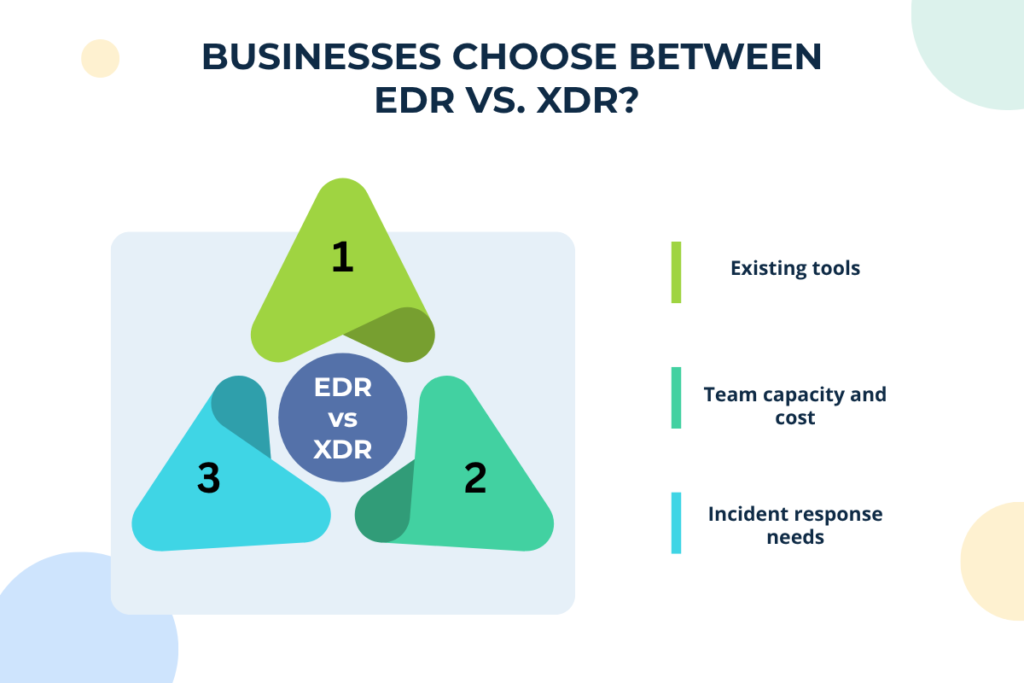
Start by identifying your security gaps, existing tools, and team capacity. If you mainly need to detect and contain threats on laptops and servers, EDR may be sufficient. If your team struggles to connect alerts across endpoints, email, identities, and cloud services, XDR may provide the broader visibility you need.
Before choosing, consider three factors:
- Existing tools: Check whether your current security products share data and can connect related alerts. An XDR platform that integrates with these tools may extend visibility without requiring a complete replacement.
- Team capacity and cost: Consider the cost of setup, training, licenses, and ongoing use. A broader platform may show more threats, but it can also take more time and effort to manage.
- Incident response needs: Check whether your team can track an attack across systems and respond quickly. NIST recommends making incident response part of your overall cybersecurity plan, so choose a tool that fits your business risks and your team’s ability to handle threats.
Review your wider endpoint security needs to identify gaps in device protection. If endpoint detection and response is your main concern, assess your endpoint detection and response capabilities before investing in broader coverage.
Before buying, test the shortlisted product with realistic attack scenarios. Check what it detects, whether it connects related events, what evidence it provides, and which response actions work in your environment.
Conclusion
EDR focuses on threats affecting individual devices, while XDR connects security signals across supported systems. The right choice in EDR vs. XDR depends on your security gaps and how your team handles threats. Review your current tools, assess your endpoint detection and response capabilities, and compare the full cost before making a decision.
Frequently Asked Questions
1. Does XDR require agents on every endpoint?
Not always. Requirements depend on the platform, its data sources, and how it collects endpoint activity. Check which devices and integrations it supports.
2. Is XDR a product or a security strategy?
XDR is generally delivered as a security platform or service, though the exact features and coverage vary by provider.
3. Can a business switch from EDR to XDR without replacing its existing tools?
Sometimes. When comparing EDR vs. XDR, check compatibility, available integrations, licensing, and whether the XDR platform can use data from your current products.
4. Does XDR eliminate the need for security analysts?
No. XDR can connect alerts and automate some actions, but analysts still need to review incidents, handle exceptions, and check whether responses worked.