Ransomware can start before your team realizes there is a problem. A strange process, unusual file activity, or a disabled security tool may be the first warning sign.
EDR in ransomware attacks helps security teams spot these signs, investigate what happened, and contain affected devices. It can also stop suspicious processes, quarantine files, or isolate an endpoint, depending on the EDR setup.
The sooner your team detects ransomware activity, the sooner it can respond. But EDR is only one part of ransomware defense. So, what exactly can EDR detect during a ransomware attack?
What Does EDR Do During a Ransomware Attack?
Endpoint Detection and Response (EDR) monitors activity on devices such as laptops, desktops, and servers. It collects information about processes, files, system events, and network connections, then uses that data to identify suspicious activity and support investigation.
Ransomware detection is one of EDR’s common uses.
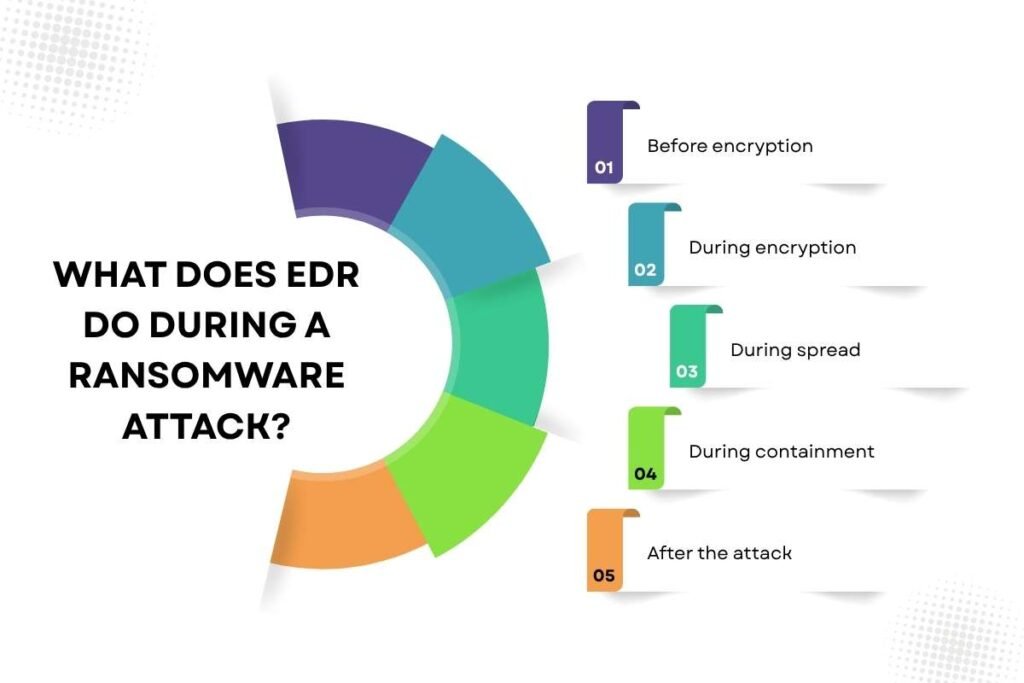
EDR in ransomware attacks can help at several points:
- Before encryption: It can detect suspicious processes, scripts, credential activity, or attempts to disable security controls.
- During encryption: It can identify unusual file activity and other signs that ransomware is affecting data.
- During spread: It can help identify unusual connections between devices and other signs of lateral movement.
- During containment: Depending on the product, it may stop a process, quarantine a file, or isolate a device.
- After the attack: Its collected endpoint data can help analysts determine what happened and which systems may have been affected.
The important point is that ransomware does not have to be detected only when files are already encrypted. The activity leading up to encryption can also provide detection opportunities.
How Does EDR Detect Ransomware Activity?
EDR detects ransomware by watching what happens on an endpoint, including processes, files, services, and system activity. This helps it spot suspicious behavior even when the ransomware does not match a known malware signature.
For example, EDR may see a suspicious program start, run a command, change large numbers of files, and create new file extensions. If the same activity also includes deleting shadow copies or creating ransom notes, the signs become more concerning.
MITRE ATT&CK identifies rapid file writes, unusual file extensions, ransom-note creation, registry changes, and shadow-copy deletion as useful signals for detecting data encryption attacks.
EDR looks at the activity around the encryption, not only the moment when files are locked. This can give security teams an earlier chance to investigate and respond.
Which Ransomware Behaviors Can EDR Detect?
Below are the signs that can help teams spot ransomware before the damage grows.
Rapid file changes:
EDR can detect a large number of files being written, changed, or renamed in a short time. This may indicate that ransomware is encrypting data.
Suspicious scripts:
EDR can monitor PowerShell and command-line activity. When these tools are used with other suspicious actions, they may point to ransomware activity.
Shadow-copy deletion:
Attackers may try to delete shadow copies that could help restore files. EDR can detect commands used to remove them.
Security-tool tampering:
Attempts to stop or modify security tools can be a warning sign that an attacker is preparing to launch ransomware.
Lateral movement:
EDR can show unusual connections between endpoints. This can help teams spot attempts to spread ransomware across the network.
Ransom note creation:
Creating ransom notes across multiple folders can provide another strong sign of a ransomware attack.
Recovery interference:
Ransomware may try to stop backup or recovery services before encrypting files. EDR can help detect this activity.
With EDR in ransomware attacks, it is important to look at these signs together. A sudden spike in file changes becomes more concerning when it happens with suspicious processes, recovery changes, or unusual network activity.
Can EDR Stop Ransomware Before Files Are Encrypted?

Sometimes, yes. But there is no guarantee. If an EDR system detects suspicious activity early enough, the security team may be able to stop the process before it encrypts a large amount of data. Some EDR products also support actions such as process termination, file quarantine, or endpoint isolation.
Consider a workstation where a suspicious program begins changing hundreds of documents. If the behavior is detected quickly, the security team could stop the process and isolate the device while checking what happened.
That does not mean every ransomware attack will be stopped in time.
Detection may occur after some files have already been encrypted. An attacker may also use legitimate tools, compromise security controls, or operate in a way that makes detection harder.
EDR can reduce the time between suspicious activity and response, but it cannot promise zero damage.
How Does EDR Help Contain a Ransomware Attack?
EDR can support containment by giving analysts control over affected endpoints. Depending on the product, common actions include stopping a suspicious process, quarantining a malicious file, or isolating the device from the network.
Endpoint isolation is especially important when ransomware may be spreading between systems. An isolated device can have its network access restricted while the security team investigates the incident.
CISA recommends network segmentation, a method of separating devices and systems into smaller network sections so ransomware cannot easily spread between them. EDR can also help detect unusual connections between devices.
A practical response is to detect the suspicious activity, isolate the affected endpoint, stop the process, and check for other affected devices.
The response depends on the alert and the organization’s rules. High-confidence threats may be handled automatically, while uncertain alerts may need analyst review.
For larger attacks, EDR works alongside an incident response plan that defines how the team investigates, contains, and recovers from the incident.
What Happens When Ransomware Tries to Disable EDR?
Attackers know that endpoint security can interfere with ransomware. Some therefore try to disable or weaken security tools before launching the encryption stage.
This can involve stopping security services, changing settings, clearing logs, or abusing vulnerable drivers that can interfere with security software.
ESET Research reported in March 2026 that EDR-killer tools were being used in ransomware intrusions. Its research describes several methods, including Bring Your Own Vulnerable Driver attacks and techniques that interfere with EDR software without relying on a driver.
MITRE ATT&CK also records ransomware-related groups using techniques to disable or modify security tools.
This creates an important detection point. An attempt to disable EDR can itself be a warning sign. Security teams should monitor for unexpected changes to security services, unusual driver activity, attempts to modify endpoint protections, and other actions that could weaken detection.
EDR also needs protection of its own. Tamper protection, restricted administrative access, secure configuration, and other endpoint controls can make it harder for an attacker to interfere with security software.
What Role Does EDR Play in a Ransomware Attack?

Once ransomware is detected, the next question is often: How did it get here, and how far did it spread?
EDR data can help answer that.
Depending on the product, analysts may be able to review:
- Which process started the suspicious activity?
- Which user account was involved?
- What commands or scripts were executed?
- Which files were created or changed?
- Which systems did the endpoint connect to?
- Did similar activity appear on other endpoints?
- When did the suspicious activity begin?
- Were security controls modified?
This information can help build a timeline of the attack.
For example, an analyst may find that a suspicious process started on one laptop, connected to another internal system, and was followed by similar file activity on several devices. That evidence can help the team identify affected endpoints and decide where containment is needed.
Endpoint data can turn an isolated ransomware alert into a clearer picture of the incident.
What Are the Limits of EDR in Ransomware Attacks?
EDR (pillar) can help during a ransomware attack, but it has some important limits:
- Limited endpoint visibility: Devices that are not covered, stop reporting, or have missing telemetry can create detection gaps.
- Detection is not perfect: New attack methods, legitimate tools, or attacker-controlled security tools can make ransomware harder to detect.
- It does not cover everything: Cloud storage, identity systems, network infrastructure, and backup platforms may need separate security controls.
- Attackers may target EDR: Ransomware operators can try to disable or bypass endpoint security before encryption begins.
- EDR cannot recover data: It can help detect and contain an attack, but it cannot restore encrypted or lost files.
Secure backups, recovery testing, and a clear response plan are still essential for ransomware recovery.
Conclusion
EDR in ransomware attacks helps security teams spot behaviors, investigate what happened, and contain affected endpoints. It can also provide the endpoint evidence needed to understand how an attack started and where it spread.
But EDR should not be treated as a complete ransomware defense. Secure backups, strong identity controls, network segmentation, vulnerability management, and a tested response plan remain essential.
For organizations building a wider endpoint security strategy, understanding how EDR works is the next step.
FAQs
Can EDR detect ransomware on a network share?
It can provide useful endpoint signals when a device accesses or changes files on a network share. This makes EDR in ransomware attacks useful for monitoring suspicious file activity. However, coverage depends on the EDR product and the activity it can observe.
Does EDR protect against ransomware without internet access?
Yes, to some extent. EDR can continue monitoring and detecting threats locally without internet access. However, cloud-based features may be limited until connectivity is restored.
Can EDR protect backup servers from ransomware?
Yes, if the backup server is supported and covered by the EDR. It can help detect suspicious activity on that system.
Can EDR identify which user launched ransomware?
Yes. EDR can often link suspicious processes and activity to the user account involved.
Does EDR work on virtual machines during a ransomware attack?
Yes, if the virtual machines support the EDR agent and are properly monitored.