Companies often work with outside vendors, suppliers, clients, and contractors. These users may need access to apps owned by another organization, but creating and managing a separate login for every person can add extra work.
SAML federation solves this by letting separate identity systems work together. One organization checks the user’s login, while another app accepts that verified login information.
The key difference is that SAML federation is not just about signing in to many apps. It creates a connection between separate organizations, with rules for who can send login information, what the receiving app should accept, and what user details can be shared.
What is the SAML Federation and How Does It Work?
SAML federation allows two or more organizations to trust login information from each other. It uses SAML, an XML-based standard, to send information about a user’s login from one system to another. OASIS describes SAML as a standard for exchanging security information between separate business systems.
A SAML setup has two main sides. The Identity Provider (IdP) checks the user’s identity and creates the login message. The Service Provider (SP) is the app that receives that message and decides whether the user can enter.
The process usually works like this:
- The user opens an app.
- The app sends the user to the IdP to sign in.
- The IdP checks the user’s login.
- The IdP creates a SAML assertion, which is a message confirming the login.
- The message is sent to the app.
- The app checks the message.
- The user gets access if the checks pass.
The user’s password does not need to be sent to the partner app. The app relies on the login message from the trusted identity provider instead.
How Do Two Organizations Set Up Trust?
A SAML federation connection starts with an agreement between the two sides. Before users can log in, the IdP and SP need to know which systems they are connecting to and what information they should accept.
The setup can include:
- System names and IDs
- Login and response addresses
- Signing keys or certificates
- User information that can be shared
- Login rules
- SAML settings supported by each side
These details give the SP a clear way to identify the IdP and check incoming messages. OASIS defines SAML metadata as a way to share details such as system IDs, service addresses, and keys used to check signatures.
The two organizations do not have to use the same certificate authority. What matters is that the SP has a trusted way to check the key used by the IdP to sign the SAML message. OWASP notes that the trust link between an IdP and SP is often built around a trusted signing certificate.
In simple terms, the SP needs to know which system it trusts, which key it should trust, and which app the login message is meant for.
How Do Metadata and Certificates Keep a Federation Running?

Once a SAML connection is live, the setup details need to stay current. A change to a login address, system ID, or signing certificate can cause users to lose access if the other side does not know about it.
SAML metadata helps partners share and update these settings. OASIS created its Metadata Interoperability Profile to make the setup and management of SAML connections more consistent, especially when many partner systems are involved.
Organizations should keep a simple process for managing these changes:
- Assign someone to own federation settings.
- Review important changes before they go live.
- Track certificate expiry dates.
- Confirm where new metadata comes from.
- Test changes before production use.
- Keep a way to roll back a bad change.
Certificates need special attention. If an old signing certificate expires before the SP starts trusting the replacement, users may not be able to log in.
Microsoft recommends making the new certificate available before the old certificate stops being used, giving connected applications time to pick up the change.
This makes certificate renewal a planned task rather than a last-minute fix.
What Information is Inside a SAML Login Message?
A SAML assertion is a message that tells an app that a user has been verified. It can also carry basic information that helps the app identify the user and process the login.
The message may include a user ID, name, email, or other approved user details. It can also show which identity provider issued the message, which app should receive it, and how long the message remains valid.
These details give the app enough information to process the login without receiving the user’s password. NIST also states that assertions can carry authentication information and, where allowed, user attributes.
The receiving app should check the details before accepting the login. For example, the Audience value helps show that the message is meant for the correct app. NIST includes audience checks as a required part of stronger federation protections.
So, a SAML assertion is not just a “yes, this person logged in” message. It also gives the app information it needs to decide whether that login should be accepted.
How Should Organizations Secure a SAML Federation?
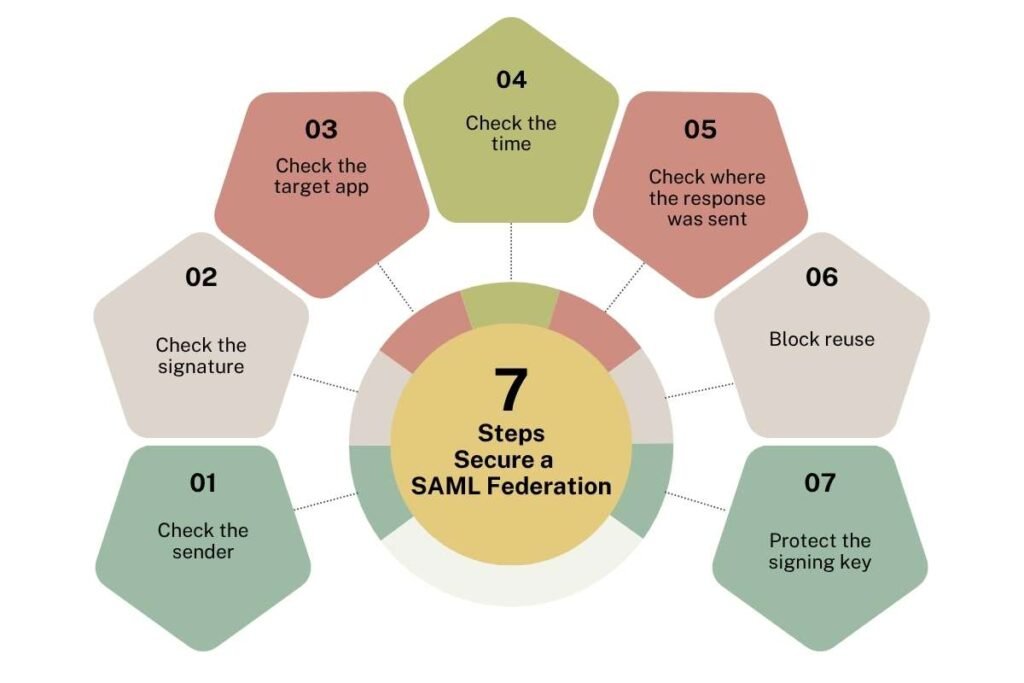
Security depends on how the receiving app checks the SAML message. A valid digital signature is important, but it is only one part of the check.
OWASP recommends checking the message, its signature, where it came from, which app it targets, its time limits, and other SAML fields before accepting it.
1. Check the sender:
The SP should confirm that the message came from the trusted IdP. This helps block messages from an unknown source.
2. Check the signature:
The app should verify the digital signature with the trusted key. It should also make sure the signature covers the part of the message the app is using.
OWASP warns that weak XML handling can allow signature-wrapping attacks, where an app may read the wrong part of a signed message.
3. Check the target app:
The message should be meant for that specific service provider. The Audience value helps the app confirm this. NIST requires audience limits at higher federation assurance levels.
4. Check the time:
A SAML message can include a start and end time. The SP should reject a message that is too old or not yet valid.
Short message lifetimes can also reduce the chance that a stolen message will be useful later. OWASP recommends short SAML response lifetimes as a security measure.
5. Check where the response was sent:
The app should make sure the response was sent to the expected SAML endpoint. OWASP recommends checking the Destination value against the expected Assertion Consumer Service (ACS) URL.
6. Block reuse:
A SAML message should not be accepted again after it has already been used. Replay checks help stop someone from reusing a captured login message. Both NIST and OWASP include replay protection in their federation security guidance.
7. Protect the signing key:
The private key used by the IdP to sign messages needs strong protection. If an attacker gets that key, they may be able to create fake SAML responses that look like they came from the trusted IdP. OWASP highlights signing-key protection as an important part of SAML security.
Which SAML Federation Risks Matter Most?
The main risks come from bad settings, stolen keys, old connections, and weak checks. These risks can affect the trust between the two organizations and may lead to failed logins or unwanted access.
| Risk | What it can cause | Main way to reduce it |
| Hacked IdP | Fake or unwanted login messages | Protect the IdP and its signing keys |
| Wrong trust settings | The app accepts the wrong source | Review trusted IDs and keys |
| Reused login message | A captured login may be used again | Add replay checks and short time limits |
| XML signature attack | The app reads the wrong part of a message | Use proper XML and signature checks |
| Expired certificate | Users may suddenly lose access | Plan certificate changes early |
| Too much user data | Extra user information is shared | Send only needed attributes |
| Wrong endpoint | A response goes to the wrong app | Check the expected ACS address |
| Old federation link | An unused partner may stay trusted | Review and remove old connections |
One risk that deserves extra attention is a compromised identity provider. Because the IdP creates the login messages, a serious problem there can affect the apps that trust it.
How Should a Company Set Up SAML Federation?

A good setup starts with clear ownership and a simple plan. The goal is to define the connection first, then test it before users depend on it.
1. Decide who handles each role
Choose which system will check the user and which app will receive the login. This gives the teams a clear IdP and SP setup.
2. Define what the SP will accept
Set the trusted IdP, signing key, user details, and SAML settings before the connection goes live.
3. Exchange SAML metadata
Share the setup information needed by both systems. This can include system IDs, endpoints, and keys.
4. Limit the user data
Decide what the app actually needs. A user ID or email may be enough, so there is no reason to send extra information.
5. Test the full login
Check the whole flow before launch. Make sure the SP can verify the sender, signature, target app, time limits, and other required fields.
6. Test certificate changes
Do not wait until the old certificate is close to expiry. Test the new one while the current certificate still works.
7. Monitor the connection
Keep an eye on failed logins, certificate dates, and important setup changes. This can help teams spot problems early.
8. Remove old connections
When a vendor, application, or business relationship ends, remove its SAML connection. Old trust settings should not remain active without a clear reason.
NIST’s SP 800-63C-4 requires relying parties to validate federation assertions and sets additional protections around issues such as audience limits, replay, and assertion injection.
What Are the Main Benefits and Limits of SAML Federation?

SAML federation can be a good fit when separate organizations need to give users access to shared apps. Its biggest value is that each side can keep managing its own users while still supporting access to the partner’s system.
Benefits
SAML federation can reduce duplicate accounts. A user can sign in through their own organization instead of creating another password for a partner application.
It can also make partner access easier to manage. When the user’s main account is changed or removed, the organization can control whether that person should still have access to connected services.
SAML is also widely used for business applications and supports federation between separately managed systems. OASIS identifies identity federation across organizational boundaries as a core SAML use case.
Limitations
SAML connections can take time to set up, especially when many partners are involved. Every connection needs the right endpoints, keys, user details, and settings.
The setup also needs ongoing care. Certificates expire, apps change their URLs, and old partner connections may no longer be needed.
SAML uses XML, which means the receiving app must handle and check the data correctly. This is one reason secure SAML libraries and careful message checks matter.
For organizations with many partner connections, the main challenge is often not the first setup. It is keeping every connection correct over time.
Conclusion:
SAML federation lets separate organizations share trusted login information without creating a separate password for every partner app.
It can make cross-company access easier, but the setup still needs regular checks. Keeping certificates, metadata, login messages, and old connections under control helps keep the federation safe and reliable.
Frequently Asked Questions
1. Can one identity provider connect to several service providers?
Yes. One IdP can support many SPs, with each application having its own setup and trust settings. NIST notes that a single identity provider can provide federation services to multiple separately managed relying parties.
2. Does the SAML federation work only for company employees?
No. It can also be used for contractors, partners, suppliers, and other users when the organizations agree on how access will work.
3. Can a company remove one federation connection without changing the others?
Yes. Each partner connection can be managed separately, so an organization can end one relationship while keeping other connections active.
4. Does the SAML federation support more than one identity provider?
Yes. Each partner connection can be managed separately, so an organization can end one relationship while keeping other connections active.
5. Does the SAML federation support more than one identity provider?
Yes. An application can be set up to work with multiple identity providers when its design and trust settings support it. NIST notes that relying parties may use more than one credential service provider.
6. Can SAML federation carry user information besides a login result?
Yes. SAML assertions can include approved user attributes along with information about the authentication event.