What happens when a threat never triggers an EDR alert?
EDR threat hunting helps security teams find suspicious activity by actively searching endpoint data instead of waiting for an alert. Analysts can look for unusual processes, commands, file changes, user activity, and network connections.
This gives teams a way to investigate activity that automated detections may miss and check whether the same behavior appears on other devices.
This article explains how EDR threat hunting works, what endpoint data analysts can search, which attacker behaviors they can look for, and what to do when a hunt finds something suspicious.
How Does an EDR Threat Hunt Begin?
A threat hunt usually starts with a specific question or suspicion. An analyst may investigate a known attack technique, suspicious behavior, or an indicator linked to a possible threat.
For example, a team may ask, “Has PowerShell been used to run suspicious commands across our endpoints?” The analyst can then search endpoint records for PowerShell activity, examine the parent process, review the user account, and check whether the behavior appeared on other devices.
This is what separates threat hunting from a standard alert investigation. Instead of following a signal that the EDR has already flagged, the analyst starts with something they want to investigate and searches the available data for evidence.
Why is EDR Useful for Threat Hunting?

Threat hunting depends on having useful evidence to search. EDR can collect detailed endpoint activity, including processes, files, system changes, network connections, and user or device behavior.
This gives analysts more context than a single alert. They can examine what happened before an event, what happened after it, and whether similar activity occurred on other devices.
For example, an analyst investigating a suspicious script may find that it was launched by an unusual parent process, ran under a privileged account, and then made a network connection. The combination of these events can be more useful than any single event on its own.
What Data Can Security Teams Hunt With EDR?
EDR collects different types of endpoint activity that analysts can search during a hunt. The most useful data includes:
- Process activity: Shows which programs ran, when they started, which user launched them, and what process started them.
- Command-line data: Records the commands and scripts used to launch programs, which can help identify unusual activity.
- File activity: Shows when files are created, changed, renamed, or executed.
- Network activity: Records connections from endpoints to IP addresses, domains, ports, and other devices.
- User activity: Links endpoint actions to specific user accounts, helping analysts investigate unusual account behavior.
- System changes: Captures changes involving services, scheduled tasks, registry settings, and other system configurations.
- Event timelines: Put different endpoint events in sequence so analysts can see what happened before and after suspicious activity.
Together, these records give analysts the context needed to connect separate events and investigate what happened on an endpoint.
What Threats Can Analysts Hunt With EDR?
With the endpoint data, analysts can investigate suspicious behaviors such as:
1. PowerShell abuse:
Analysts can look for unusual PowerShell commands, especially when they are linked to suspicious processes or network activity.
2. Process execution abuse:
Unexpected programs or unusual parent-child process relationships can indicate that a legitimate tool is being used suspiciously.
3. Persistence:
Attackers may create services or scheduled tasks to maintain access after a device restarts.
4. Credential discovery:
Unusual attempts to access credentials, account information, or other sensitive data can point to an attacker looking for ways to expand access.
5. Lateral movement:
Analysts can look for activity showing an account or device connecting to other endpoints in an unusual pattern.
6. Remote access:
Unexpected remote logins or remote-control activity can indicate unauthorized access to a device.
7. Command-and-control:
Unusual connections to external systems may indicate communication between an infected endpoint and an attacker’s infrastructure.
8. Security tool tampering:
Attempts to disable or interfere with security software can be a sign that an attacker is trying to avoid detection.
9. Unusual software:
Programs that are rare in the environment or unexpected on a particular device may warrant investigation.
How Does EDR Threat Hunting Work?
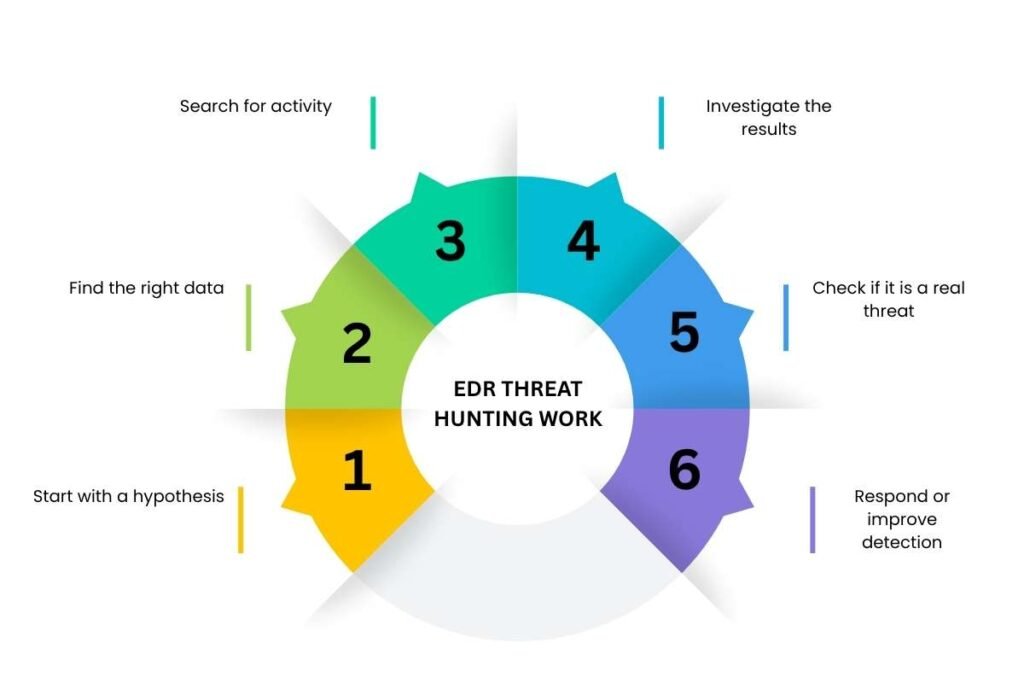
A hunt usually starts with a specific question about suspicious activity. From there, analysts use endpoint data to test the idea, investigate what they find, and decide what to do next.
Start with a hypothesis:
The analyst identifies a behavior, indicator, or attack technique they want to investigate.
Find the right data:
They choose endpoint records that can help confirm or rule out the suspected activity.
Search for activity:
EDR queries and filters are used to find matching processes, commands, files, users, or network connections.
Investigate the results:
Analysts look at the surrounding activity, including what happened before and after the event and whether it appeared on other devices.
Check if it is a real threat:
Suspicious activity is compared with normal business or administrative activity to avoid treating legitimate actions as attacks.
Respond or improve detection:
Confirmed threats can be investigated or contained, while useful findings can be turned into new detection rules for future activity.
What Happens After EDR Threat Hunting Finds a Threat?
Finding suspicious activity is the beginning. Analysts need to determine whether it is malicious, how far it has spread, and what action is needed.
They may review the affected endpoint, identify related processes and accounts, search for the same activity elsewhere, and build a timeline of the event.
If the activity is confirmed as malicious, the team may isolate a device, stop a process, quarantine a file, or take other response actions.
For incidents that require broader coordination, EDR works alongside an incident response plan that defines investigation and recovery steps.
How Can Security Teams Improve EDR Threat Hunting?

Better hunting comes from asking focused questions and making useful hunts repeatable. A few practices can make the process more effective:
1) Start with attacker behavior
Hunt for specific behaviors such as unusual PowerShell use, remote access, process discovery, or attempts to create persistence. This gives analysts a clear search target.
2) Use current threat intelligence.
When threat intelligence identifies a new command, tool, or attack technique, teams can search their EDR data for the same behavior.
3) Save useful queries
A hunt that works well should not be rebuilt from scratch. Teams can save queries for common behaviors and reuse them during future investigations.
4) Turn successful hunts into detections
If a hunt repeatedly finds suspicious activity, its search logic can often become a detection rule for ongoing monitoring.
5) Map hunts to MITRE ATT&CK
ATT&CK techniques help teams organize hunts around known attacker behaviors and identify areas that may need more coverage.
6) Bring in other security data when needed.
EDR may show what happened on a device, but identity, email, network, or cloud data can provide the missing context when an investigation extends beyond the endpoint.
For organizations looking at the broader endpoint security picture, EDR threat hunting is one part of how endpoint visibility supports detection and investigation. It works best when paired with strong endpoint controls, clear response procedures, and reliable security data.
Conclusion:
EDR threat hunting works best when teams search for specific attacker behaviors, use reliable endpoint data, and turn useful findings into repeatable detections.
Start with focused hunts around behaviors such as suspicious PowerShell use, unusual remote access, or persistence, then expand the investigation when the evidence points to other systems or accounts. This approach helps teams get more value from the EDR data they already collect and strengthen their Endpoint Detection and Response strategy.
FAQs
How often should security teams perform EDR threat hunting?
The frequency depends on the organization’s threat exposure, available telemetry, and security team capacity.
Can small businesses benefit from proactive threat hunting?
Yes. Smaller teams can focus on a few high-value behaviors and known threats rather than running broad hunts.
What skills are needed for threat hunting?
Threat hunters typically need skills in endpoint analysis, attack techniques, security queries, scripting, and incident investigation.
Can EDR threat hunting help with insider threats?
Yes. Endpoint activity can help identify unusual user behavior, unauthorized actions, and suspicious use of systems.