Can your team investigate suspicious activity on an employee’s laptop and respond quickly, even outside business hours?
Endpoint detection and response (EDR) tools help spot and investigate threats on devices. But someone still needs to review alerts, understand what happened, and decide how to respond. Managed EDR gives businesses outside help with these tasks, which can ease the pressure on small security teams.
Before choosing a provider, understand what the service covers, which actions the provider can take, and what your own team must handle.
What Is Managed EDR and How Does It Work?
It is a service in which a security provider deploys, runs, and supports EDR tools on a business’s behalf. According to Cisco, the service may include security analysts who investigate threats and help remove them.
The process usually has three main steps:
- Monitor devices: EDR tools collect activity from supported laptops, desktops, and servers to spot signs of an attack.
- Investigate alerts: Security analysts review suspicious activity to find out what happened, which device is affected, and how serious the threat may be.
- Respond to threats: The provider may contain a threat, recommend action, or ask your team to approve a response, depending on the service agreement.
For example, an employee may open a fake invoice that runs harmful software. The EDR tool flags suspicious activity, and the provider investigates the device’s activity to determine whether the threat is real. If the device is at risk, the provider may isolate it from the company network if that action is supported and authorized.
What Are the Key Features of Managed EDR?
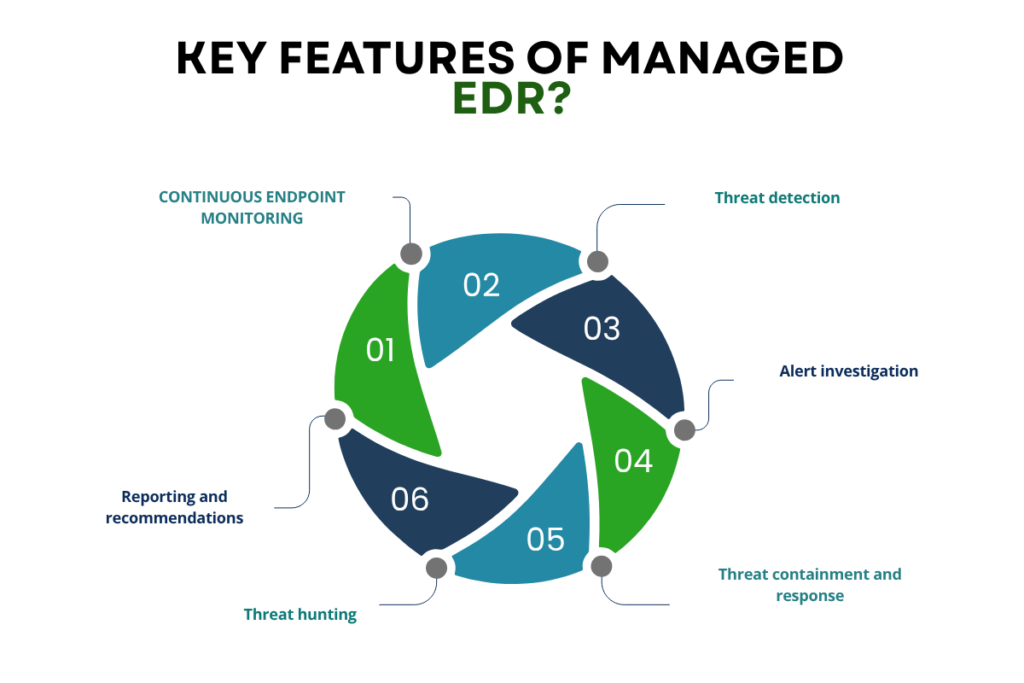
It combines endpoint security technology with services that help businesses act on security alerts. The exact features vary by provider and contract, so confirm what is included rather than assuming every service offers the same coverage.
Key features may include:
- Continuous endpoint monitoring: Tracks activity on covered laptops, desktops, and servers. Check whether monitoring is available around the clock or only during agreed hours.
- Threat detection: Flags suspicious activity, including behavior that may indicate malware, ransomware, or unauthorized access.
- Alert investigation: Reviews alerts, related activity, and affected devices to help determine whether a genuine threat exists.
- Threat containment and response: Supports actions such as isolating an affected device or blocking harmful activity, subject to the platform’s capabilities and the provider’s authority.
- Threat hunting: Searches for signs of suspicious activity that may not have triggered a standard alert, if this service is included.
- Reporting and recommendations: Provides incident records, findings, and advice on addressing security gaps.
These features serve different purposes. Monitoring creates visibility, investigation helps establish what happened, and response limits the impact of a confirmed threat. When comparing providers, check how each capability works in practice and whether it carries additional charges.
How Does Managed EDR Improve Threat Detection?
EDR software can generate alerts, but an alert alone does not confirm an attack. Managed EDR adds security expertise to the process by helping review alerts, assess their severity, and investigate activity that may otherwise go unnoticed or remain unresolved.
It can support threat detection in several ways.
- It helps filter and prioritize alerts. A provider can investigate suspicious events and separate likely threats from false alarms. This helps internal teams focus on events that need attention instead of treating every alert as equally urgent.
- It adds context to suspicious activity. An isolated event may look harmless on its own. Reviewing related activity and alerts can help show whether it is part of a wider attack.
- It supports timely containment. Once a threat is confirmed, an authorized provider may isolate an affected device or take another supported response action.
The result depends on endpoint coverage, detection quality, monitoring hours, and how quickly the provider acts. The service cannot guarantee that every attack will be detected or stopped, but effective investigation and response processes can help teams handle threats more consistently.
Which Businesses Should Consider Managed EDR?

This service can suit businesses that need endpoint protection but cannot dedicate enough staff to monitoring and incident response.
It may be useful for:
- Small security teams: Businesses with limited in-house expertise can get help investigating alerts and responding to endpoint threats.
- Growing organizations: More employees, devices, and remote connections can increase the work needed to monitor endpoints.
- Businesses without after-hours coverage: A provider may supply monitoring outside the company’s normal working hours, depending on its service agreement.
- Organizations with existing security staff: Internal teams can use managed support for selected tasks while retaining control over security strategy and major decisions.
Businesses should assess the service alongside their wider endpoint security requirements. Managed EDR focuses on covered endpoints, so organizations may still need separate controls for email, cloud services, networks, identities, backups, and other parts of their environment.
How Do You Choose a Managed EDR Provider?
The right provider should offer the coverage, response support, and reporting your business needs. Compare the service terms as carefully as the technology.
1. Confirm endpoint coverage:
Check support for the operating systems, laptops, desktops, servers, and virtual machines your organization uses. Ask how new devices are added and how coverage gaps are reported.
2. Check monitoring hours and response commitments:
Find out whether monitoring is available 24/7, how urgent alerts are escalated, and whether the contract defines response targets. Ask what happens when an alert arrives outside your team’s working hours.
3. Clarify response authority:
Can the provider isolate a device immediately, or must your team approve the action first? Agree on which actions can be taken independently and when your team must be contacted. Unclear permissions can delay a response or cause unwanted business disruption.
4. Review integrations and reporting:
Check whether the service works with your existing security tools and whether reports identify incidents, affected devices, actions taken, and outstanding risks.
5. Calculate the full cost:
Consider licensing, setup, support, the number of covered devices, optional threat hunting, and extra incident response services. Confirm how renewals and changes in device count affect the price.
6. Define the provider’s scope:
Some services focus on endpoints, while others cover a wider range of security systems. Confirm what the provider monitors and handles, and see how EDR differs from MDR (comparison) before choosing.
Before signing, ask the provider to walk through a realistic incident scenario. The answer should make clear who investigates, who contacts your team, who can isolate a device, and who is responsible for the next steps.
What Are the Best Practices for Managed EDR Implementation?

Selecting a provider is only the first step. The service also needs to be configured, tested, and reviewed so your team knows how it will work during an incident.
- Cover all endpoints: Inventory devices and confirm they are enrolled and sending security data.
- Define responsibilities: Assign roles for alert review, incident escalation, response approval, and recovery.
- Test the setup: Verify integrations, alerts, and response actions before relying on the service.
- Review performance: Check device coverage, incident reports, and response times regularly.
- Update procedures: Adjust configurations and response steps as your business changes.
Align these practices with your incident response plan to support a coordinated response.
What Are the Limitations of Managed EDR?
It has limitations businesses should consider:
- Incomplete endpoint coverage: Unmanaged or unsupported devices can leave security gaps. Offline devices may also limit real-time monitoring and response.
- Limited response authority: Providers may investigate threats but require your team to approve containment, restore systems, or manage communications. Confirm these responsibilities before signing.
- Dependence on other security controls: The service does not replace access controls, software updates, backups, or recovery plans.
- Limited visibility beyond endpoints: Monitoring endpoints alone may not reveal threats across networks, servers, and cloud systems. CISA’s logging guidance explains why collecting logs from these systems matters.
Conclusion
Managed EDR helps businesses monitor endpoint threats and get support with investigation and response without handling every task in-house. As part of an Endpoint Detection and Response strategy, it adds external support for monitoring and handling threats. Its value depends on service coverage, response capabilities, and clearly defined responsibilities.
Before buying, check the features included, how alerts are handled, and which actions the provider can take. Then test the setup, clarify internal responsibilities, and review service performance regularly.
FAQs
1. Can Managed EDR monitor employees who work from home?
Yes, when their devices are supported, enrolled, and able to send the required security data.
2. Can endpoint monitoring protect personal devices used for work?
It depends on the provider’s supported devices, your company’s device policy, and the access required. Confirm these details before including personal devices in the service.
3. What happens when a Managed EDR contract ends?
Check how you will receive security records, who retains the data, how monitoring will continue during the change, and whether the provider will help remove or transfer its tools.