Right now, your business is running on phones. Your sales team checks CRM on the go. Your finance team approves payments from a tablet. Your executives read sensitive emails from airport WiFi. All of this keeps work moving fast.
But here is the question. How many of those devices are fully under your control?
Sometimes a lost phone, a weak password, or a random app download can put your company data at risk. Mobile device management helps keep things secure in these cases.
It gives you visibility, control, and enforcement across every mobile endpoint. In this guide, you will learn what it really means and how it works at a technical level. Most importantly, how to use it to protect your business before something goes wrong.
What Mobile Device Management Really Means for Your Security Strategy?

MDM is a tracking tool and a policy enforcement framework. It uses operating system-level controls, device certificates, identity integration, and secure communication channels to manage endpoints at scale.
In simple terms, mobile device management allows IT teams to:
- Enroll devices in a trusted environment.
- Push security policies through system APIs
- Enforce encryption and authentication.
- Monitor compliance in real time.
- Remotely lock or wipe corporate data.
According to the National Institute of Standards and Technology (NIST), organizations should manage mobile devices through centralized management technologies. These tools help keep devices secure throughout their lifecycle. That’s exactly what mobile device management provides.
Unlike basic device tracking tools, a modern MDM solution integrates with identity providers, certificate authorities, and directory services. It does so to ensure only trusted users access corporate data.
Why Executives Cannot Ignore Mobile Risk Anymore?
Mobile endpoints now outnumber traditional desktops in many industries. The International Data Corporation reports that companies are spending more to secure and manage their mobile devices.
At the same time, the Federal Bureau of Investigation warns that mobile phishing and device-based attacks continue to target businesses of all sizes.
For executives, this creates three urgent concerns. Those are data exposure, regulatory penalties, and operational downtime.
MDM tools reduce these risks by protecting data, limiting app access, and quickly isolating devices that are compromised.
How Mobile Device Management Works Behind the Scenes?
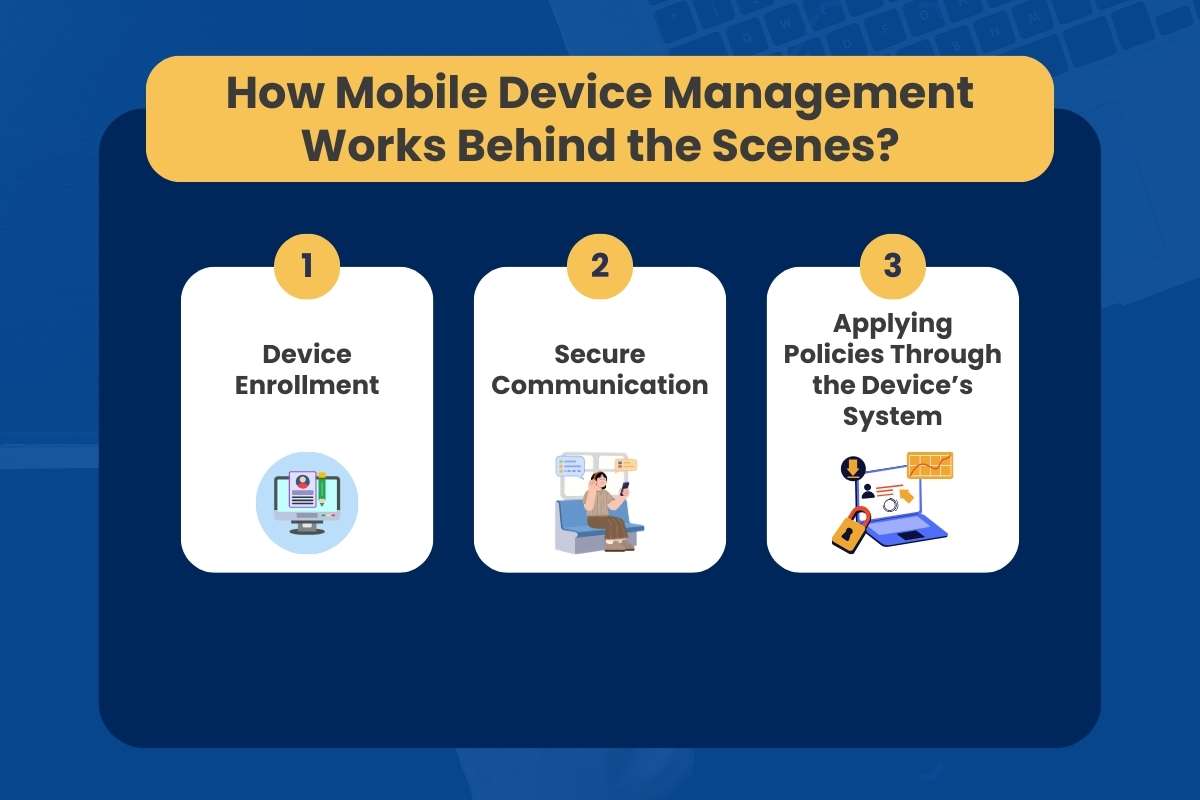
Mobile Security may seem simple on the surface, but behind the scenes, it continuously protects company data. Understand the process below to learn why MDM is such a crucial part of modern enterprise security.
Step 1: Device Enrollment
When a device enrolls, it installs a profile that securely links it to the MDM server.
Devices enroll through:
- Apple Automated Device Enrollment
- Android Zero Touch
- Manual enrollment with credentials
- QR code or token-based enrollment
Step 2: Secure Communication
The device and server communicate over encrypted HTTPS connections. The system uses device certificates to verify trust.
Step 3: Applying Policies Through the Device’s System
The MDM server uses the device’s built-in system tools to apply company policies. This can include:
- Requiring strong passcodes
- Turning on full disk encryption
- Disabling the camera or Bluetooth
- Setting up WiFi and VPN automatically
- Installing work apps without interrupting the user
The device then reports back to the MDM console to show that it is following the rules.
Also Read: Endpoint Detection and Response: How Enterprises Protect Endpoints in 2026
Stop the Confusion and Understand the Difference Between MDM, EMM, and UEM
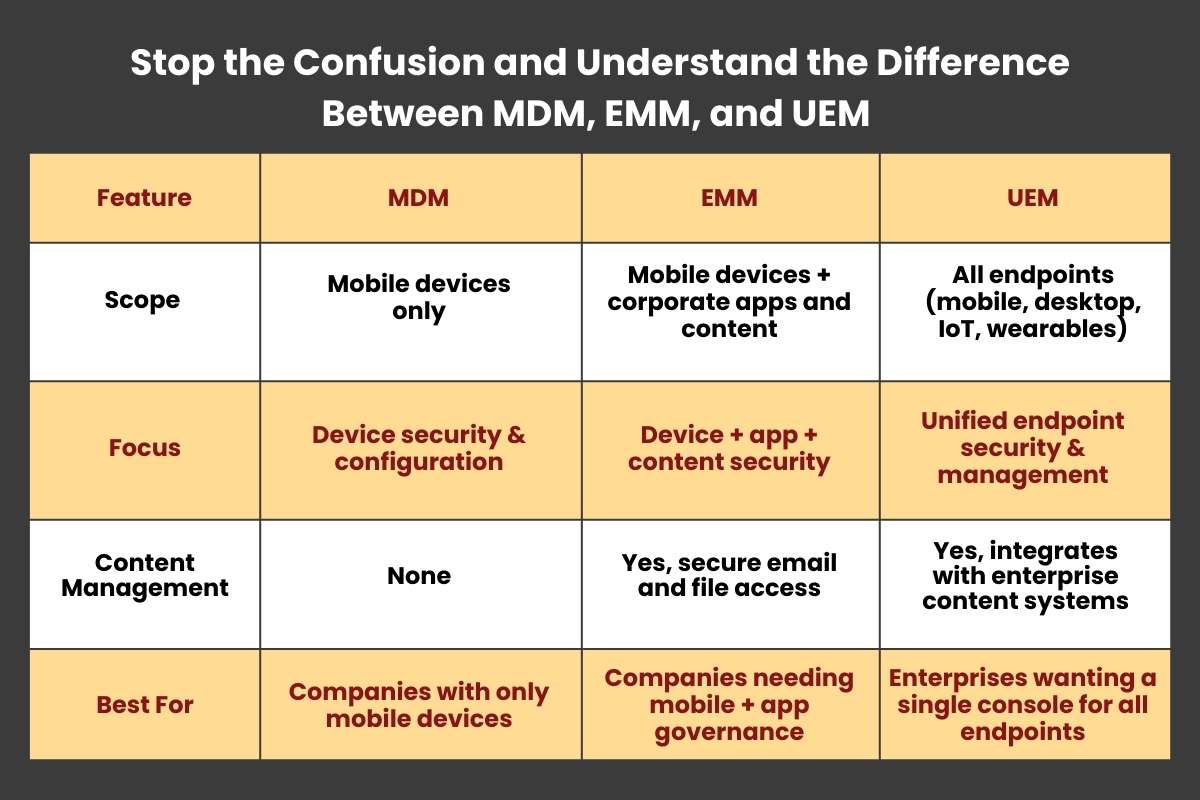
If you’re looking for enterprise mobility solutions, the acronyms can be confusing. They all deal with mobile devices, but each has a different focus and set of features. Here’s a quick breakdown:
1. MDM (Mobile Device Management)
MDM focuses on securing and managing mobile devices themselves. It controls OS-level settings, enforces security policies, and can remotely lock or wipe devices.
2. EMM (Enterprise Mobility Management)
EMM builds on MDM by adding app and content management. It controls corporate apps and data, and lets employees use their personal devices safely. It provides secure access to email, files, and apps.
3. UEM (Unified Endpoint Management)
UEM goes further. It manages all endpoints like mobile devices, desktops, IoT, and even wearables. It integrates identity, conditional access, and cross-platform security policies.
| Feature | MDM | EMM | UEM |
| Scope | Mobile devices only | Mobile devices + corporate apps and content | All endpoints (mobile, desktop, IoT, wearables) |
| Focus | Device security & configuration | Device + app + content security | Unified endpoint security & management |
| Content Management | None | Yes, secure email and file access | Yes, integrates with enterprise content systems |
| Best For | Companies with only mobile devices | Companies needing mobile + app governance | Enterprises wanting a single console for all endpoints |
Real World Use Cases That Show the Power of MDM
Imagine a nurse losing a tablet with patient records. Or a delivery driver dropping a rugged device in the field. Or a student installing a random app that crashes school networks. One device out of control, and suddenly your data, operations, and reputation are at risk.
Mobile Device Management solves these real problems for organizations across industries.
- Healthcare: Hospitals and clinics deal with sensitive patient information every day. The Health Insurance Portability and Accountability Act (HIPAA) requires them to protect this data. With MDM, devices stay encrypted, and IT can remotely erase lost or stolen devices to keep data safe and meet compliance rules.
- Retail: Point-of-sale (POS) tablets power thousands of transactions. Retailers use MDM to control apps and prevent misuse. It keeps customer data safe and operations running without interruptions.
- Logistics: Field teams rely on rugged Android devices to track shipments and manage deliveries. MDM keeps these devices set up correctly, helping reduce mistakes and prevent theft.
- Education: Schools deploy tablets to students for learning. MDM lets IT control what apps can be installed, keeping students focused and networks secure.
Across every industry, the core strength of MDM is the same, which is centralized control combined with enforcement at the device level. It keeps devices, data, and users in check without slowing work down.
Industry Trends You Should Watch Closely
Mobile devices are no longer isolated. They connect to cloud services, SaaS apps, and corporate identity platforms. As a result, security models continue to evolve rapidly.
The Center for Internet Security recommends secure configuration and continuous monitoring in its CIS Controls. Mobile Device Management directly supports both, helping organizations enforce policies and stay ahead of risks.
Another major trend is the shift toward zero-trust security. In this model, every device must prove that it meets compliance requirements before it can access corporate resources.
Modern MDM platforms now integrate with identity systems to automatically block non-compliant devices. It ensures that only trusted, secure endpoints can connect. Enterprise mobile security is changing. Continuous monitoring paired with conditional access is now becoming the standard.
Also Read: Explain the impact of cyber-attacks on businesses
Step-by-Step Implementation Plan That Reduces Risk
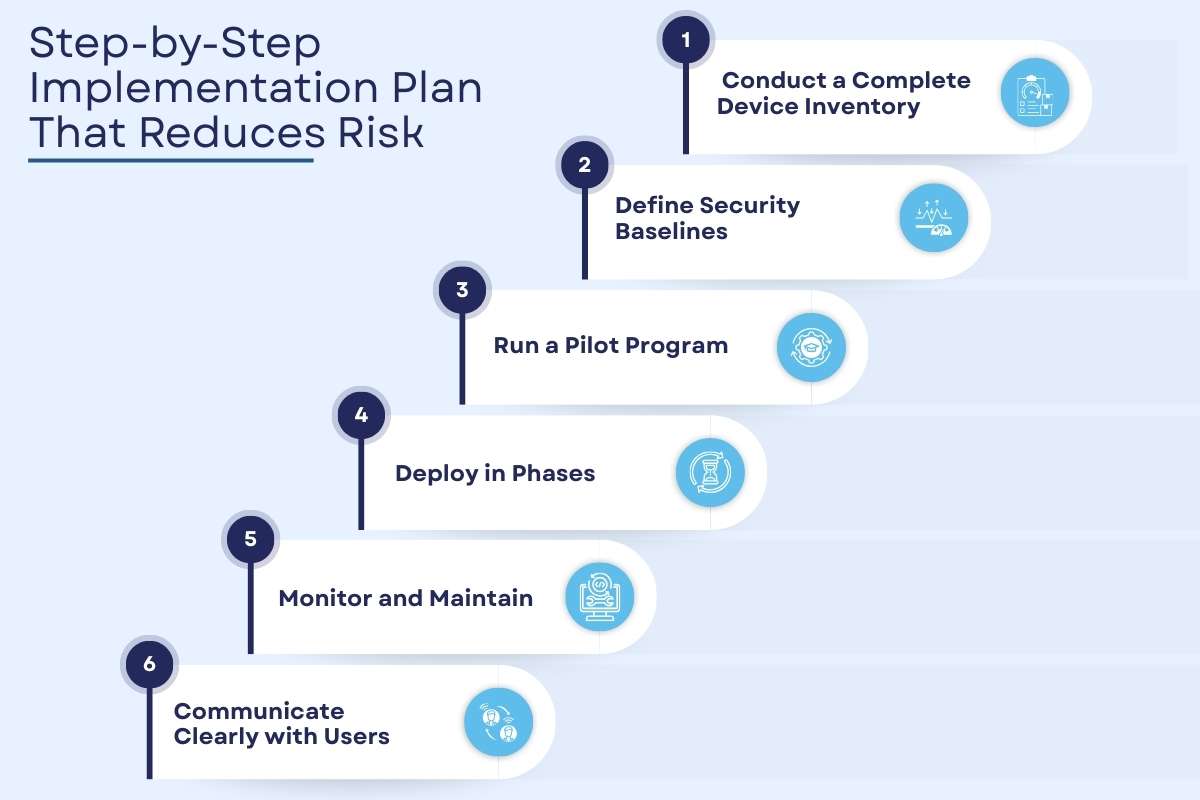
Rolling out Mobile Device Management correctly is critical. But a structured approach ensures security without disrupting daily operations.
Following these steps ensures that MDM protects your organization while keeping employees productive.
1. Conduct a Complete Device Inventory
Start by identifying all devices that access corporate resources. Separate corporate-owned devices from employee-owned devices. Knowing what you have is the foundation for effective control.
2. Define Security Baselines
Set minimum security requirements for devices. Include encryption, passcode policies, app restrictions, and OS version standards. Align these baselines with NIST guidelines or CIS Controls to ensure compliance and best practices.
3. Run a Pilot Program
Test Mobile Device Management policies with a small group of users before a full rollout. Collect feedback on usability and technical issues. Adjust policies as needed to balance security and productivity.
4. Deploy in Phases
Gradually expand MDM to all users and devices. Phased deployment allows IT to respond to issues quickly and prevents widespread disruption.
5. Monitor and Maintain
Check compliance daily through your MDM dashboard. Remove inactive devices promptly. Review security logs and policy enforcement weekly to catch anomalies early.
6. Communicate Clearly with Users
Explain what IT can monitor and enforce, and clarify what data remains private. Proper communication reduces pushback and encourages adoption.
Practical Practices that Deliver Real Results in Mobile Device Management
Below are some best practices to get the most from MDM and strengthen your mobile security posture.
- Use a certificate-based authentication instead of shared passwords.
- Keep work and personal apps separate on employee devices using secure containers.
- Automate compliance alerts so IT responds fast.
- Connect your work phone management system to your identity provider to enforce conditional access.
- Review policies every quarter because threats evolve. Your controls must evolve, too.
Buyer Checklist to Choose the Right MDM Solution
Choosing the right Mobile Device Management solution can make or break your mobile security. Before you commit, make sure the platform meets your technical and business needs.
Ask these key questions:
- Does it support automated enrollment for Apple and Android?
- Does it integrate with your identity provider?
- Does it provide detailed compliance reporting?
- Can it scale to thousands of devices?
- Does it support remote wipe for lost devices?
Executives should also evaluate vendor stability, data hosting location, and support quality.
Conclusion:
Mobile device management gives organizations visibility, enforcement power, and risk reduction. It aligns with standards from NIST and CIS. It supports compliance requirements. It protects data across industries. If your workforce relies on mobile devices, managing them effectively is no longer optional. It is a must for secure growth.
Frequently Asked Questions
Q. Will my company be able to see personal data on my phone?
In most employee-owned device programs, the system manages only the work profile. It cannot access personal photos or messages.
Q. Do I still need antivirus software on my phone if my company manages it?
No. It enforces device-level policies. You may still need mobile threat defense for advanced protection.
Q. Can small businesses control employee phones without a complex IT setup?
Yes. Cloud-based platforms allow small teams to deploy quickly without heavy infrastructure.