Slow internet, dropped calls, and apps not loading are common problems. They interrupt work and create frustration. For businesses, even a short network issue can lead to lost time and money. Teams wait, tasks get delayed, and productivity drops.
Trying to fix these problems manually is not easy. It often involves guesswork, checking multiple devices, and wasting time without clear answers.
This is where network troubleshooting tools help. They give you clear data, show where the problem is, and help you fix it faster. Instead of guessing, you can take the right action quickly.
Understanding the problem is the first step. Once you know what is wrong, fixing it becomes much easier.
What is a Network Troubleshooting Tool?
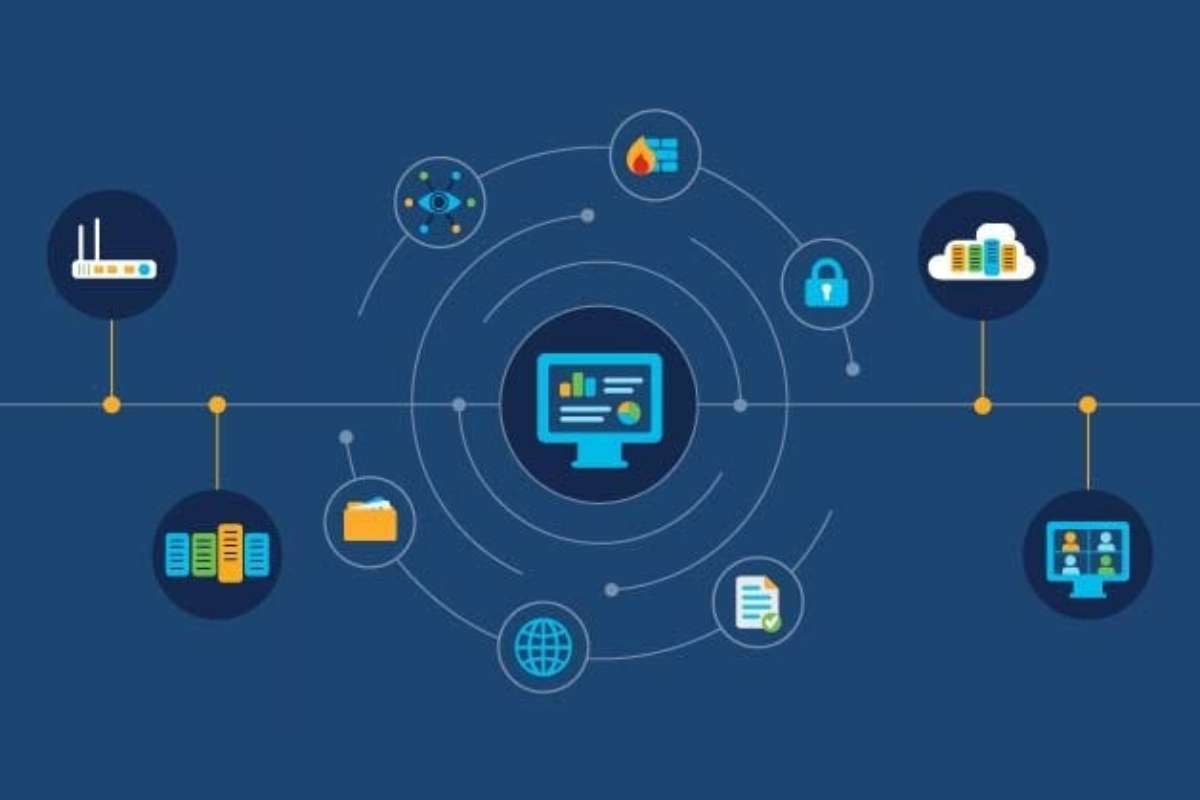
They are software or commands that help you check the health of a network. They help you find problems and understand what is causing them, instead of relying on guesswork.
They are used to:
- Check if your network is working properly
- Find where the issue is (device, cable, server, or internet)
- Measure key data like latency, packet loss, and uptime
- Identify slow connections or failures
Think of them like a doctor checking your body. When something feels wrong, tests help find the exact cause. These tools do the same for your network.
They make troubleshooting faster, more accurate, and easier to handle.
Why Do You Need Network Troubleshooting Tools?
Network issues slow down work and waste time. Without the right tools, finding the problem takes longer and causes delays.
These tools help you detect issues faster and reduce downtime. This keeps systems running smoothly and improves user experience. For businesses, less downtime means lower costs and fewer disruptions.
They also make troubleshooting easier. Many tools show clear data, so even non-experts can understand what is wrong.
The real value is simple: you save time, reduce stress, and keep work moving.
Key Features to Look For
Not all network troubleshooting tools offer the same value. The right choice depends on how easily you can find and fix issues. Focus on features that make troubleshooting faster and clearer.
- Easy dashboard
A simple dashboard helps you understand what is happening at a glance. You should not need deep technical knowledge to read it.
- Real-time monitoring
Live data lets you catch problems as they happen. This reduces downtime and improves response time.
- Alerts and notifications
Good tools send alerts when something goes wrong. This helps you act quickly without constant manual checks.
- Packet analysis
This feature shows how data moves across your network. It helps find deeper issues that basic tools may miss.
- Device discovery
Automatic detection of devices saves time. It also helps you track everything connected to your network.
- Remote access
You can troubleshoot from anywhere. This is useful for remote teams or multiple locations.
- Integration with other systems
Tools that connect with your existing setup make work easier. They help you manage everything in one place.
Avoid overly complex tools if you only need basic checks. Simple tools are often faster and easier to use.
7 Essential Network Troubleshooting Tools for Modern Networks
The table below highlights some of the most reliable tools, helping you compare their strengths and use cases in one place.
| Sr. No. | Tool | Best For | Free Version | Ease of Use |
| 1 | Wireshark | Deep packet analysis | Yes | Medium |
| 2 | Obkio | Network performance monitoring | Yes (limited) | Easy |
| 3 | ThousandEyes | End-to-end visibility | Trial only | Medium |
| 4 | SolarWinds NPM | Enterprise monitoring | No (trial) | Medium |
| 5 | PRTG | All-in-one monitoring | Yes (limited) | Easy |
| 6 | Nagios | Open-source monitoring | Yes | Hard |
| 7 | NetSpot | Wi-Fi analysis | Yes (basic) | Easy |
1. Wireshark

Wireshark is a widely used tool for deep network analysis. It captures and inspects traffic in real time, helping users see exactly what is happening inside a network. It is best suited for advanced users who need detailed insights at the packet level. While the interface can feel complex at first, it offers unmatched visibility for diagnosing issues, testing protocols, and understanding network behavior in detail.
- Supports analysis of thousands of network protocols
- Captures live traffic and allows offline packet review
2. Obkio
Obkio is built for continuous network performance monitoring with a simple setup. It uses lightweight agents to track performance between different points in your network. This makes it useful for quickly spotting issues like slow connections or unstable links. It works well for teams that want clear insights without dealing with complex configurations or heavy tools, making it a strong choice among network troubleshooting tools.
- Measures latency, jitter, and packet loss in near real time
- Uses distributed monitoring agents across network locations
3. ThousandEyes
ThousandEyes provides full visibility across networks, cloud services, and the internet. It helps teams understand how data moves across different systems and where slowdowns happen. This tool is often used by large organizations that rely on cloud apps and external services. It combines monitoring with detailed path analysis to give a complete picture of network performance.
- Maps network paths across ISPs, cloud, and SaaS platforms
- Tracks performance across both internal and external networks
4. SolarWinds Network Performance Monitor
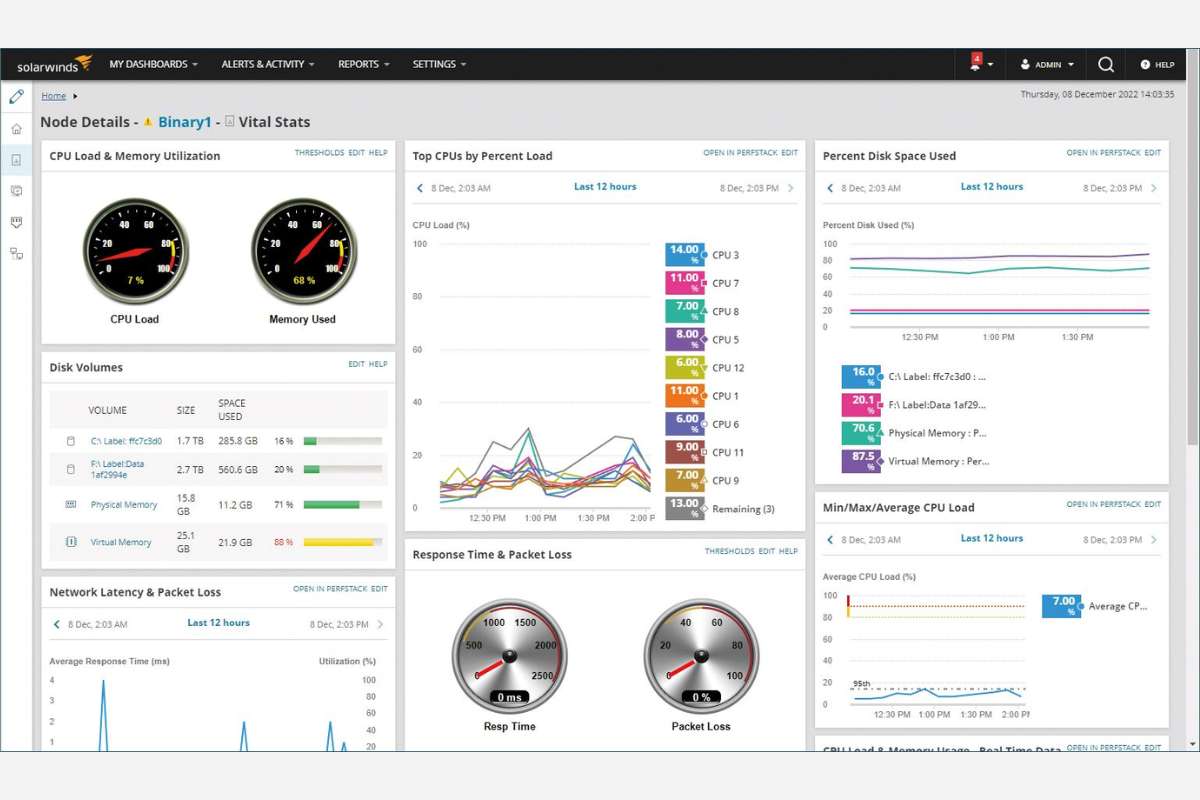
SolarWinds Network Performance Monitor is designed for large-scale network monitoring with strong visualization and alerting features. It helps teams track performance, detect failures, and respond quickly to issues. The dashboards are clear and customizable, making it easier to manage complex systems. It is commonly used in enterprise environments where uptime and performance are critical.
- Uses SNMP, WMI, and API polling for data collection
- Provides real-time alerts based on performance thresholds
Also Read: 12 Robotic Process Automation Tools That Actually Save Time in 2026
5. PRTG Network Monitor
PRTG Network Monitor is an all-in-one monitoring tool designed for ease of use. It provides a simple interface that helps users track network performance, devices, and traffic without complex setup. This makes it a strong choice for beginners and small to mid-sized teams using network troubleshooting tools. It also scales well as your network grows, offering both basic and advanced monitoring features in one platform.
- Uses a sensor-based system to monitor devices and services
- Supports bandwidth, uptime, and traffic monitoring in real time
6. Nagios
Nagios is a powerful open-source monitoring solution known for its flexibility. It allows users to customize how they monitor networks, servers, and applications. While it offers strong control and deep insights, it requires time to set up and maintain. This makes it better suited for users with technical experience who want full control over their monitoring environment.
- Monitors servers, applications, and network devices through plugins
- Supports alerting systems for downtime and performance issues
7. NetSpot
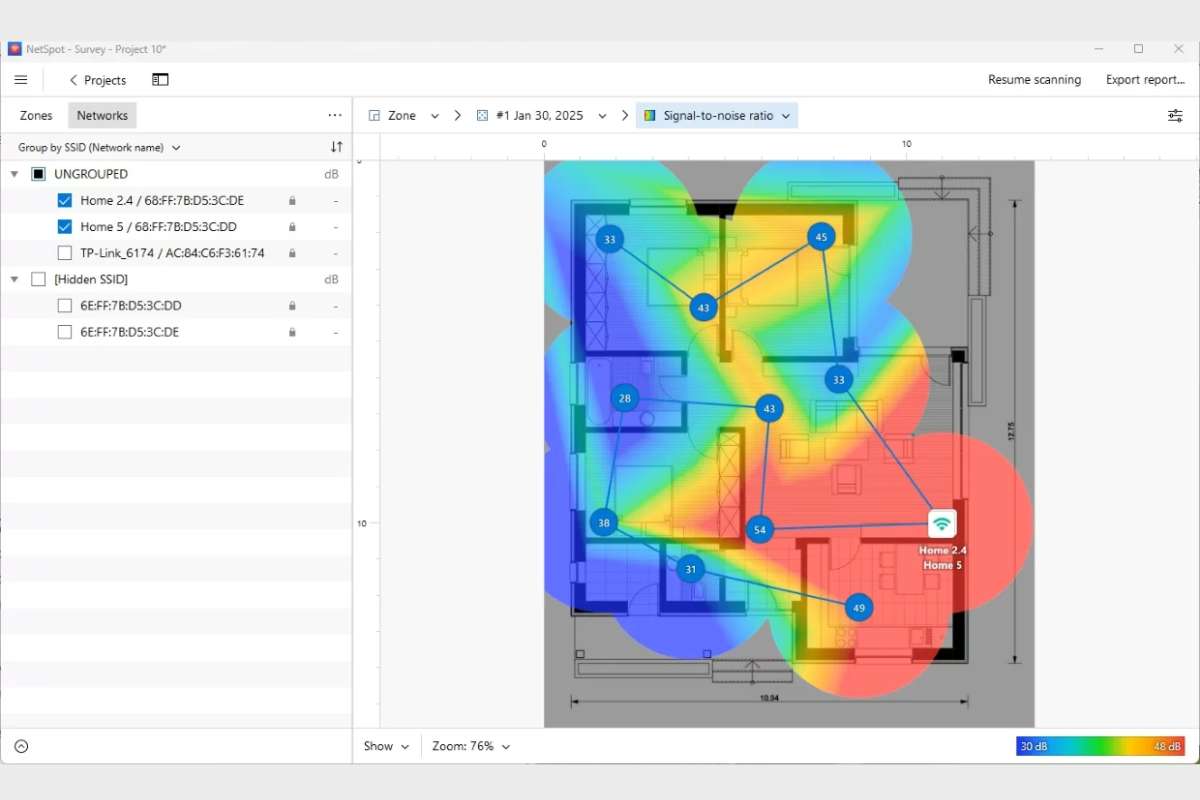
NetSpot focuses on diagnosing and improving wireless network performance. It helps users understand Wi-Fi coverage, signal strength, and problem areas through visual maps. This makes it especially useful for offices, homes, or public spaces with connectivity issues. The tool is easy to use and provides clear insights without requiring advanced networking knowledge.
- Generates Wi-Fi heatmaps to show signal strength across locations
- Detects interference, weak zones, and network coverage gaps
Free vs Paid Network Troubleshooting Tools
Choosing between free and paid options depends on your network size and needs. Free tools are a good starting point. They help you run basic checks and understand simple issues, but often need manual setup and more time.
Paid tools are built for speed and scale. They offer dashboards, automation, and support, making them better for businesses where downtime matters.
Comparison Table
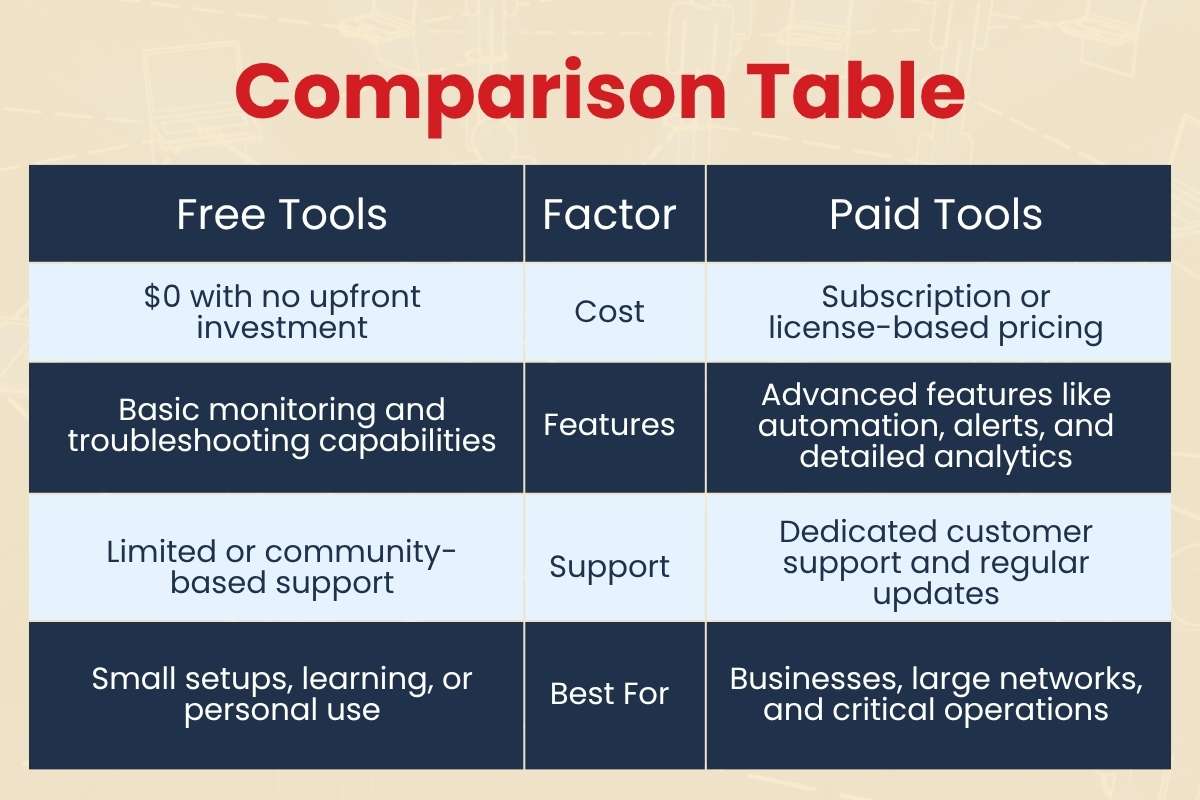
| Free Tools | Factor | Paid Tools |
| $0 with no upfront investment | Cost | Subscription or license-based pricing |
| Basic monitoring and troubleshooting capabilities | Features | Advanced features like automation, alerts, and detailed analytics |
| Limited or community-based support | Support | Dedicated customer support and regular updates |
| Small setups, learning, or personal use | Best For | Businesses, large networks, and critical operations |
Clear Takeaway
Free tools work well for learning, testing, or managing small networks. They give you enough control to find and fix common issues. Paid network troubleshooting tools are a better fit when your network grows. They help automate monitoring, reduce manual effort, and respond to problems faster.
Best Practices for Network Troubleshooting
Fixing network issues works best when you follow a clear process. Start with simple checks before using advanced tools. Many problems come from basic issues like loose cables or devices that need a restart. This saves time and avoids unnecessary complexity.
Use one tool at a time to avoid confusion. Running multiple tools together can make it harder to find the real issue. Keep a record of problems and fixes. This helps you spot patterns and solve similar issues faster in the future.
Regular monitoring is important when using network troubleshooting tools. Do not wait for something to break. Ongoing checks help you catch small issues before they grow. If you work in a team, make sure everyone understands the basics. A trained team can respond faster and reduce downtime.
Quick Checklist
- Check cables and restart devices
- Test with one tool at a time
- Record issues and solutions
- Monitor your network regularly
- Train your team on basic steps
What are the Future Trends in Network Troubleshooting Tools?

Network troubleshooting is changing fast. New tools are becoming smarter and easier to use. One major shift is AI-based detection. These tools can spot unusual patterns and find problems before users notice them. This helps reduce downtime and improve performance.
- AI integration: Tools now use AI to analyze network data and identify problems. They can suggest fixes and guide users step by step, making troubleshooting faster and easier, even for non-experts.
- Automation: Instead of just finding issues, tools can now fix them on their own. This saves time and reduces manual work, especially in large networks.
- Cloud-based monitoring: As more systems move to the cloud, tools are built to track performance across different locations. This makes it easier to manage remote teams and services.
- Security: Modern tools now include threat detection along with performance checks. This helps teams handle both network issues and risks in one place.
Visit more of our blogs! CyberPro Magazine
Conclusion
Network issues are common, but they are not hard to fix when you use the right approach. With the right network troubleshooting tools, you can quickly find problems, reduce downtime, and keep your systems running smoothly. The key is to start simple. Use basic tools to understand what is happening, then move to advanced solutions as your needs grow.
You do not need to use every tool at once. Focus on what fits your setup and build from there. Over time, this will save effort and make troubleshooting easier.
Pick one tool today and test it on your network.
FAQs
1. What is the easiest network troubleshooting tool for beginners?
Tools like Ping and PRTG Network Monitor are good starting points. Ping helps check if a device is reachable, while PRTG offers a simple dashboard for monitoring without a complex setup.
2. Are free network troubleshooting tools enough?
Free tools are enough for small networks or basic troubleshooting. They can detect common issues, but larger networks often need paid tools for automation, alerts, and deeper insights.
3. Which tool is best for fixing Wi-Fi problems?
NetSpot is a strong choice for Wi-Fi issues. It shows signal strength, coverage areas, and weak spots using visual heatmaps.
4. Do you need technical skills to use these tools?
Basic network troubleshooting tools are easy to use and need little technical knowledge. Advanced tools like Wireshark or Nagios may require training to understand detailed data and configurations.
5. How often should you monitor your network?
Network monitoring should be continuous or done regularly. This helps detect small issues early and prevents larger problems later.