This guide explains Security Assertion Markup Language in simple terms, including how it works, why it supports secure single sign-on, its core components, authentication flow, security features, and best practices. It also compares SAML with OAuth and OpenID Connect, helping businesses understand when to use each authentication standard for secure and efficient identity management.
Logging into work apps should not mean remembering a different password for every tool. Yet many businesses use dozens of cloud services every day. Without a secure way to manage logins, passwords become hard to track, and security risks grow.
This is where Security Assertion Markup Language comes in. It helps people sign in once and safely access multiple trusted applications without entering their password again and again. In this guide, you’ll learn what it is, how it works, why it matters, and how businesses use it to protect user accounts.
What is SAML?
If you’ve ever logged into one work app and found yourself already signed in to several others, you’ve likely used Security Assertion Markup Language without knowing it.
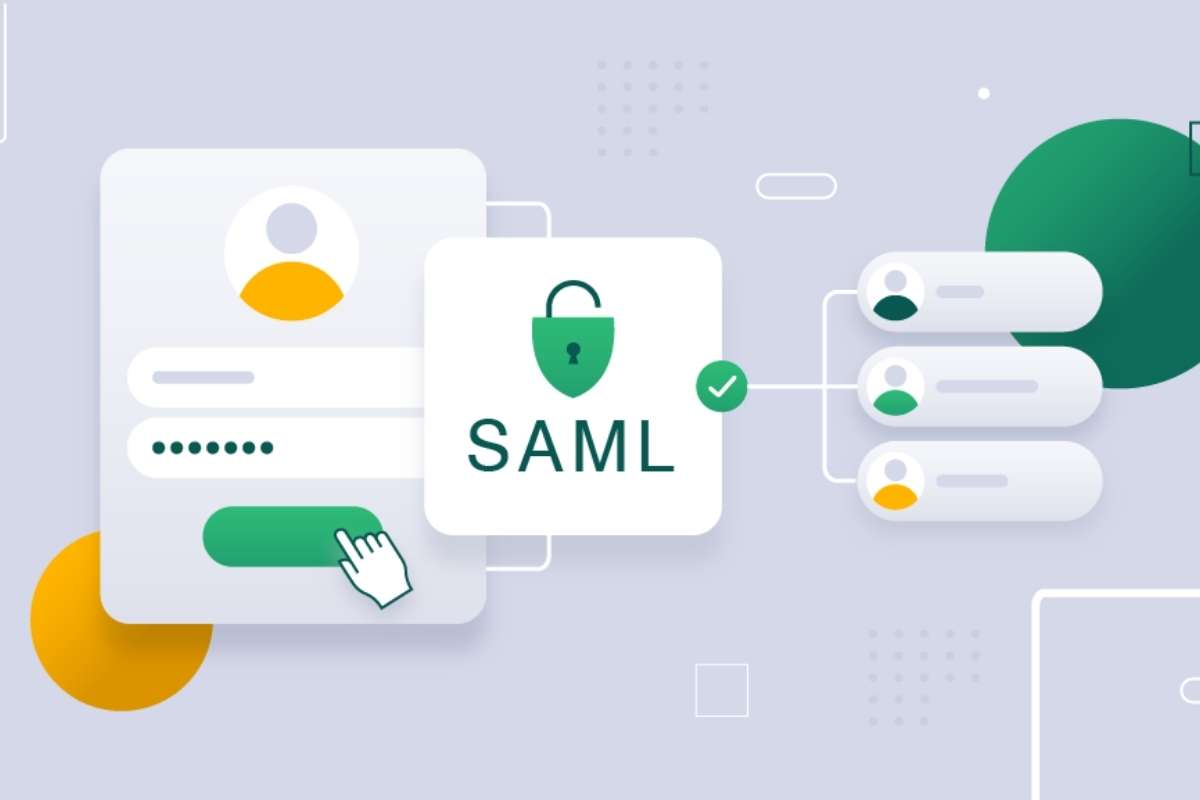
It is an open standard based on XML that allows one trusted system to confirm your identity to another. Instead of every application asking for your username and password, one system checks who you are and tells other trusted apps that you have already been verified.
Two main systems make this possible:
- Identity Provider (IdP): Verifies who you are.
- Service Provider (SP): The application you want to use.
For example, when an employee signs into their company account, they may instantly gain access to email, project software, and internal portals without signing in again. That saves time while keeping access secure.
Why SAML Matters in Modern Cybersecurity

Today, companies use more cloud services than ever before. Managing separate passwords for each one creates more chances for mistakes and security problems.
Using Security Assertion Markup Language helps organizations centralize user authentication. Employees sign in once, while IT teams manage access from one place. When someone joins or leaves the company, administrators can quickly grant or remove access across many applications.
This also helps reduce password reuse, which is a common cause of account breaches. That is why stronger identity management has become a key part of modern cybersecurity.
Also Read: Identity and Access Management: Components, Working, and Why Most Projects Fail?
Benefits of Using SAML
1. Better Security
Security Assertion Markup Language removes the need to store passwords across multiple systems. Fewer storage points mean fewer attack surfaces. Hackers have fewer doors to knock on.
It also supports strong authentication methods. When combined with multi-factor authentication, SAML adds an extra shield to user accounts.
2. Improved User Experience
No one enjoys repeated logins. With SAML, users sign in once and move across apps without interruption.
This creates a smooth workflow. It reduces frustration and keeps users focused. A simple login experience often leads to better productivity.
3. Faster Access
Time matters in any organization. Logging in multiple times wastes minutes that add up over the day.
SAML speeds up access. Users get instant access to the tools they need. This helps teams work faster and stay efficient.
4. Easy Management
Managing access for hundreds or thousands of users can feel overwhelming. SAML simplifies this process.
Admins control permissions from a central system. They can grant or revoke access in seconds. This reduces manual work and lowers the chance of errors.
5. Scalability
As companies grow, their systems grow too. New tools, new users, and new access needs come into play.
Security Assertion Markup Language handles this growth with ease. It works well for small teams and scales smoothly for large enterprises. There is no need to rebuild the system as the organization expands.
How Does It Work?
Although the process happens in seconds, several secure steps take place behind the scenes.
Here is a simple example:
- A user opens an application.
- The application sends the user to an Identity Provider.
- The user signs in using company credentials.
- The Identity Provider confirms the user’s identity.
- It creates a secure SAML assertion.
- The application checks that assertion.
- If everything is valid, access is granted.
The user never has to enter another password for that application. Instead, trusted systems communicate securely using Security Assertion Markup Language, making login both easier and safer.
Core Components
Several parts work together to make SAML authentication secure and reliable. Each has a different job.
- Identity Provider (IdP): This system checks the user’s identity. It confirms that the login details are correct before allowing access.
- Service Provider (SP): This is the application or website the user wants to open, such as a company portal or cloud service.
- SAML Assertion: This is a secure message that tells the application the user has already been verified.
- Metadata: It contains important setup details that help the Identity Provider and Service Provider recognize and trust each other.
- Certificates: Digital certificates prove that messages come from trusted systems and have not been changed.
Together, these parts allow Security Assertion Markup Language to provide secure login without asking users to enter their password for every application.
What Are SAML Assertions?
A SAML assertion carries information from the Identity Provider to the Service Provider. Different assertions serve different purposes.
| Assertion Type | Purpose |
| Authentication Assertion | Confirms that the user has successfully signed in. |
| Attribute Assertion | Shares user details such as name, email, or department. |
| Authorization Decision Assertion | States whether the user has permission to perform a specific action. |
Most organizations rely on the first two types every day. The authorization decision assertion is used less often because many applications handle permissions on their own. No matter the type, each assertion helps the Security Assertion Markup Language share trusted identity information between systems.
Step-by-Step SAML Authentication Flow
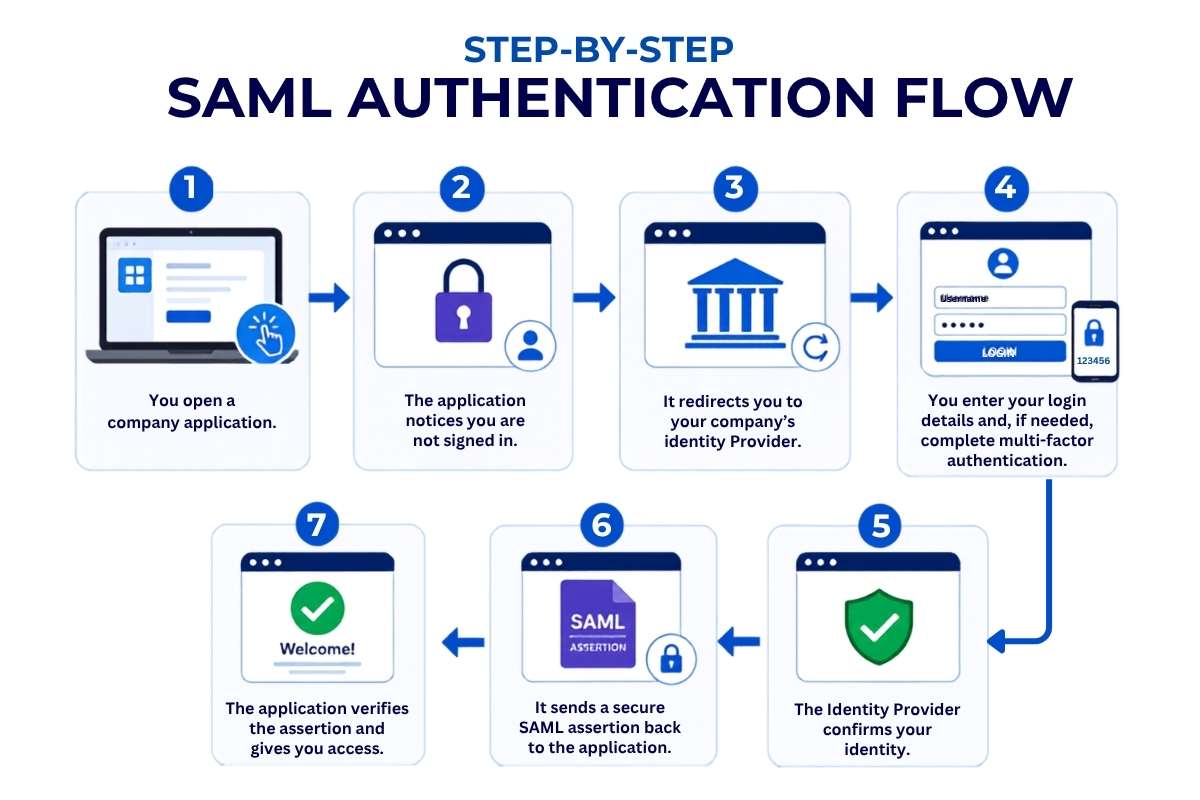
Looking at the login process from the user’s side makes it even easier to understand.
- You open a company application.
- The application notices you are not signed in.
- It redirects you to your company’s Identity Provider.
- You enter your login details and, if needed, complete multi-factor authentication.
- The Identity Provider confirms your identity.
- It sends a secure SAML assertion back to the application.
- The application verifies the assertion and gives you access.
The whole process usually takes only a few seconds. Once you are signed in, you can often open other connected applications without logging in again.
This approach has become more important as identity attacks continue to grow. According to the Microsoft Digital Defense Report 2025, identity-based cyberattacks continued to increase, making secure authentication one of the highest priorities for organizations.
By allowing trusted systems to verify users, Security Assertion Markup Language helps reduce the need for repeated passwords while improving security.
Understanding SAML Single Sign-On
Single Sign-On, or SSO, lets users sign in once and access several connected applications with the same login session.
Many organizations use Security Assertion Markup Language to make this possible. After an employee signs into their company account, they may be able to open Microsoft 365, Salesforce, Workday, and other approved tools without signing in again.
This saves time, reduces forgotten passwords, and cuts down on help desk requests. It also gives IT teams better control because user access can be managed from one central system instead of many separate applications.
Built-in Security Features
Good login systems need more than convenience. They also need strong protection. Security Assertion Markup Language includes several security features that help keep user accounts safe.
One of the most important features is digital signatures. These prove that a SAML message came from a trusted source and was not changed during transmission.
Many organizations also use encryption to protect the information inside a SAML assertion. Even if someone intercepted the message, they would not be able to read it.
SAML assertions are also time–limited. They expire after a short period, reducing the chance that an old assertion can be reused. Along with certificate validation, these features help trusted systems exchange identity information securely.
SAML Security Best Practices
Even a secure standard needs the right setup. Following a few best practices helps organizations get the most out of SAML authentication.
- Protect private keys and certificates.
- Replace certificates before they expire.
- Always use HTTPS for secure communication.
- Turn on multi-factor authentication (MFA).
- Keep assertion lifetimes short.
- Review authentication logs regularly.
- Update identity systems and applications on time.
These steps reduce common security risks and make identity management more reliable.
According to the Verizon Data Breach Investigations Report (DBIR) 2025, credential abuse remained one of the leading attack methods in investigated security incidents. Strong authentication and careful identity management help lower that risk.
Following these practices allows organizations to use Security Assertion Markup Language with greater confidence while keeping user accounts better protected.
Comparing OAuth and OpenID Connect
SAML, OAuth, and OpenID Connect all help users access online services, but they are designed for different jobs.
| Feature | SAML | OAuth | OpenID Connect |
| Main purpose | Authentication | Authorization | Authentication and identity |
| Common users | Businesses and enterprises | APIs and applications | Websites and mobile apps |
| Data format | XML | Access tokens | JSON Web Tokens (JWT) |
| Best use | Employee Single Sign-On | Giving apps limited access | Consumer login systems |
Many large organizations still choose Security Assertion Markup Language because it works well for employee login across many business applications. It is trusted by enterprises and supported by most major identity providers.
OAuth is different. It allows one application to access another application’s data without sharing a user’s password. For example, a photo editing app may ask for permission to save images to your cloud storage.
OpenID Connect builds on OAuth by adding user authentication. It is popular for websites and mobile apps where users sign in with accounts like Google or Microsoft.
Many companies use more than one of these standards because each solves a different problem.
Challenges and Limitations of SAML
Even though Security Assertion Markup Language is powerful, it comes with a few real-world challenges. These do not make it weak, but they do require attention during setup and use.
1. Complex Setup
Setting up SAML is not plug-and-play. It needs careful configuration between the Identity Provider and Service Provider.
Each system must trust the other. Certificates, endpoints, and metadata must match correctly. A small mistake can break the login flow.
Teams often need skilled developers or IT experts to handle SAML integration. This makes the initial setup slow for some organizations.
2. XML Dependency
SAML relies on XML to send data. XML is structured, but it can feel heavy and complex.
Debugging XML files takes time. Even a small error in tags or formatting can stop the process.
Modern developers often prefer lighter formats like JSON. Compared to them, XML used in SAML feels outdated and harder to manage.
3. Not Ideal for Mobile Apps
Mobile apps need fast and lightweight authentication. Security Assertion Markup Language was designed mainly for web-based systems.
It does not fit smoothly into mobile-first environments. Developers often need extra layers or workarounds.
Because of this, many mobile apps choose newer methods instead of SAML.
4. Performance Issues
SAML uses assertions that carry user data. These files can become large.
Large assertions take more time to process and transfer. This can slow down login speed, especially in high-traffic systems.
In most cases, the delay is small. But at scale, it can affect performance if Security Assertion Markup Language is not optimized properly.
5. Security Risks if Misconfigured
SAML is secure by design. But a poor setup can create risks.
If certificates are not managed well, attackers may exploit the system. If validation rules are weak, fake assertions might pass through.
This is why proper configuration and regular checks are critical when using SAML.
Despite these challenges, many organizations still rely on SAML. Its strong structure, proven reliability, and wide adoption make it a trusted choice.
Implementing Authentication Successfully
Setting up SAML is easier when the process is planned carefully.
A typical implementation follows these steps:
- Choose an Identity Provider that supports your business needs.
- Configure each Service Provider that users will access.
- Exchange metadata between the two systems.
- Install and verify digital certificates.
- Test the login process with different user accounts.
- Turn on logging to monitor authentication events.
- Review the setup regularly and update certificates before they expire.
One common mistake is forgetting to renew certificates or update metadata after making changes. Either issue can stop users from signing in.
With the right planning and regular maintenance, Security Assertion Markup Language can provide secure, reliable authentication for both users and administrators.
Conclusion
Managing user logins does not have to be difficult. SAML makes it possible for people to sign in once and securely access the applications they need every day.
For businesses, it improves security, reduces password problems, and simplifies identity management. Understanding Security Assertion Markup Language helps organizations choose stronger authentication methods while giving users a faster and smoother login experience.
FAQs
1. Is SAML only used for enterprise applications?
Mostly, yes. SAML is widely used by businesses, schools, and government organizations. Many cloud services also support it for secure employee and partner logins.
2. Can SAML work with multi-factor authentication?
Yes. Users can complete multi-factor authentication before the Identity Provider creates the SAML assertion, adding another layer of security.
3. Is SAML still relevant in 2026?
Yes. Many enterprises continue using SAML because it is reliable, widely supported, and works well with Single Sign-On for business applications.
4. What happens if a SAML assertion expires?
Once an assertion expires, the application rejects it. The user usually needs to sign in again to receive a new, valid assertion.
5. Can OAuth replace SAML completely?
No. OAuth focuses on authorization, while SAML focuses on authentication. Many organizations use both standards together because they serve different purposes.