Phishing accounts for over 90% of cyberattacks, primarily through deceptive emails. One click can leave most businesses wide open to disaster.
At the same time, remote work, SaaS apps, and cloud platforms have pushed employees to access corporate data from anywhere. Traditional network security tools were not built for this reality.
Most users now interact with the internet for almost every task. They open cloud apps, download files, and click links from email or chat. Each action can expose the organization to malware, phishing, and data leaks. This is where a secure web gateway (SWG) becomes essential.
It acts as a checkpoint between users and the internet. The goal is to allow safe activity and block harmful content before it reaches users.
Let’s look at what a secure web gateway is, how it works, and why organizations use it to protect their networks.
What is a Secure Web Gateway?

SWG is a cybersecurity solution that filters and monitors internet traffic between users and the web. It applies security policies and blocks malicious websites, malware, and unauthorized data transfers.
In simple terms, a SWG works like a security checkpoint for internet traffic.
When a user tries to access a website or download a file, the request passes through the gateway first. The system inspects the traffic and checks it against security rules. If the traffic is safe, the gateway allows it to continue to the destination. If not, it blocks it.
This helps organizations stop threats before they reach employee devices or internal networks.
Modern web gateways can run in the cloud or on company infrastructure. Many companies now use cloud SWGs because employees work from multiple locations.
How Does a Secure Web Gateway Actually Work?
The process of SWG happens within seconds so that users can browse normally without noticeable delays.
Here is how the process usually works.
- A user visits a website or clicks a link: When someone tries to access a website, the request does not go straight to the internet. It first goes through the gateway.
- The gateway checks the website address: The system compares the URL against known block lists and threat databases. It immediately blocks access if the site has a bad reputation or links to phishing or malware.
- The gateway scans content for malware: If the site looks safe, the gateway moves to the next step. It scans the page and downloads files for malicious code.
- The gateway inspects encrypted traffic: Most internet traffic today uses HTTPS encryption. The gateway temporarily decrypts this traffic so it can detect hidden threats before sending it to the user.
- Deep packet inspection analyzes the data: The system examines the details inside the web traffic. This helps detect suspicious behavior or hidden malicious content.
- Application control enforces company policies: The gateway can block risky applications. These include unauthorized file-sharing tools or suspicious web apps.
- The gateway tests unknown files in a sandbox: If a file looks suspicious, the gateway runs it in a safe virtual environment. This allows the system to observe its behavior without risking the actual network.
- Artificial intelligence detects new threats: Modern gateways analyze traffic patterns and attack behavior. This helps them detect threats that block lists may miss.
- The system routes traffic through secure cloud proxies: The system sends internet traffic through secure cloud servers. This keeps remote employees protected wherever they work.
The gateway uses several layers of inspection. This helps it to stop phishing links, malware downloads, and other web threats before they reach employee devices. It also records web activity for monitoring and investigation.
Threat intelligence updates in real time help the system stay prepared for new and evolving cyberattacks.
Why Secure Web Gateways are Now Critical for Network Security?

Web-based attacks are the biggest threat to organizations today. Hackers hide malware in legitimate websites, phishing pages, and drive-by downloads. One click can compromise an entire system.
Only 3% of organizations have mature cybersecurity readiness to fight today’s threats. This leaves a huge gap for attackers to exploit.
Traditional firewalls protect only the network perimeter. They cannot secure employees who work from home, airports, or cafes. Employees often access corporate resources directly through the internet. Without the web protection layer, organizations lose visibility and control over this traffic.
In today’s world of remote work, cloud apps, and SaaS tools, the security layer is essential. It closes gaps that firewalls and basic security tools leave open. It protects both users and company systems from modern web threats.
Key Features and Benefits of Secure Web Gateway
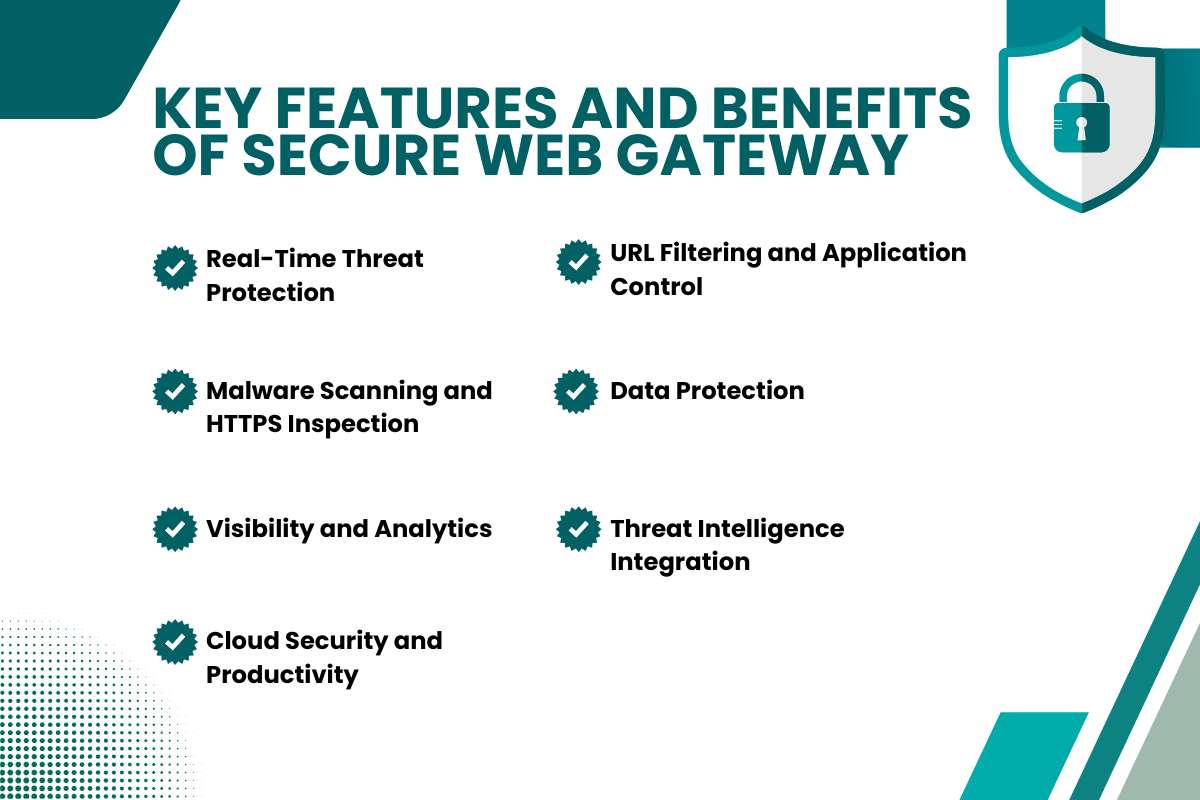
Gateways protect organizations from web threats. They also improve security visibility and operational efficiency.
- Real-Time Threat Protection: The gateway scans web traffic and blocks malware, phishing sites, and suspicious activity. It stops infections and ransomware before they reach devices.
- URL Filtering and Application Control: Organizations can control which websites and web applications employees access. Teams can block harmful or non-work sites while allowing productive tools.
- Malware Scanning and HTTPS Inspection: The gateway checks downloads for malicious code. It decrypts encrypted traffic and scans it for hidden threats.
- Data Protection: Data Loss Prevention (DLP) prevents sensitive information from leaving the network without authorization.
- Visibility and Analytics: Security teams can monitor web activity and application use. This helps them detect risky behavior and enforce policies.
- Threat Intelligence Integration: Gateways receive updates from global threat databases. These updates help them respond to new attacks quickly.
- Cloud Security and Productivity: SWGs integrate with cloud architectures such as Secure Access Service Edge (SASE). They secure remote access while allowing employees to stay productive.
Also Read: Are Your Files Really Safe? The Hidden Cloud Security Threats You Shouldn’t Ignore
How Secure Web Gateway Support Compliance Requirements?

Organizations in regulated industries must follow strict data protection requirements. These include financial regulations, healthcare privacy laws, and global data protection frameworks. Companies must monitor how employees access the internet and how sensitive data moves outside the network.
SWGs help apply these controls by monitoring and filtering web traffic. They inspect user activity and apply security policies across the network. This allows organizations to control which websites, applications, and services employees can access.
SWGs also maintain detailed logs of web activity. Security teams use these records to investigate incidents and review policy enforcement. These logs also support internal reviews and regulatory audits.
The International Organization for Standardization defines security guidelines under ISO 27001. These guidelines require organizations to monitor network traffic and protect sensitive information.
SWGs support these requirements through traffic inspection, activity monitoring, and policy enforcement.
Secure Web Gateways vs Other Security Tools: What Each One Really Protects?
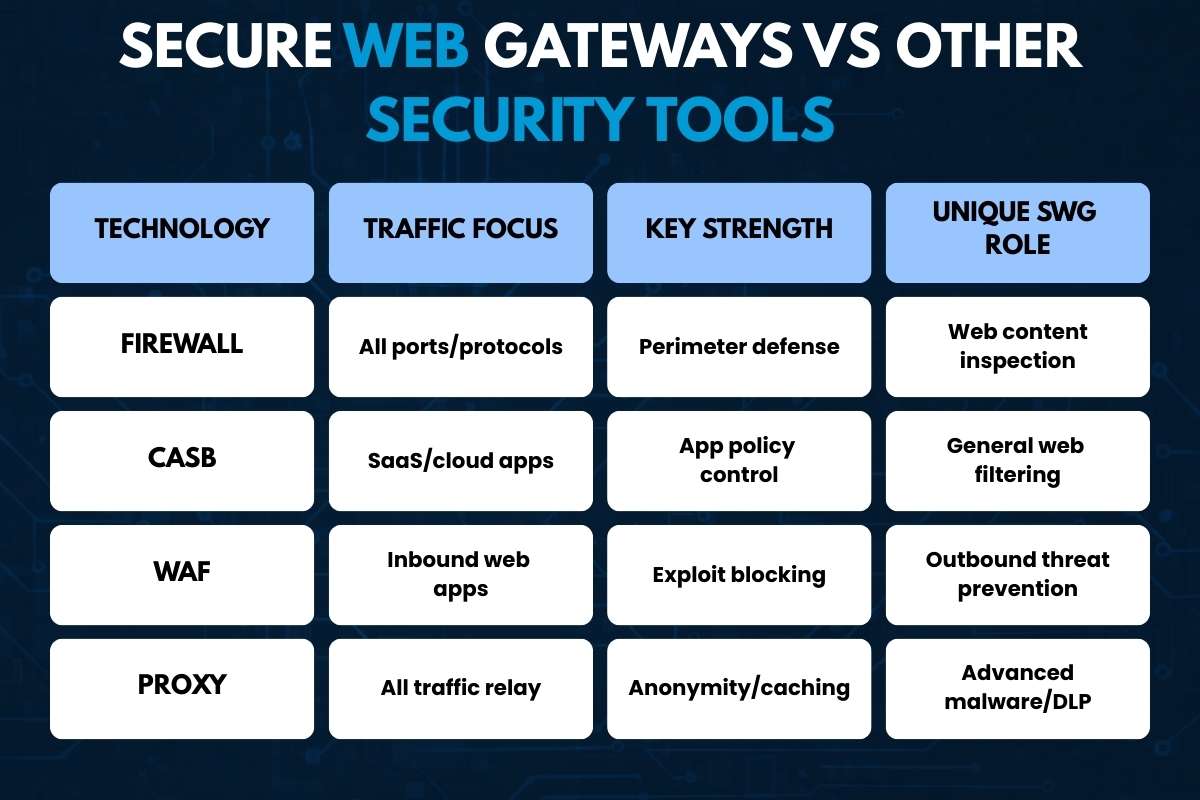
Security teams rely on multiple tools to protect networks, applications, and data. Each tool solves a different problem. SWG focuses on web-based threats that many other controls miss.
1. Firewall:
A firewall controls traffic that enters or leaves a network. It filters connections based on IP addresses, ports, and protocols. Traditional firewalls inspect traffic at lower OSI layers. Next-generation firewalls add some application awareness.
However, they still do not analyze web content deeply. An SWG inspects HTTP and HTTPS traffic. It checks URL reputation and scans downloads for malware.
2. Cloud Access Security Broker (CASB):
CASBs focus on Software-as-a-Service applications. These include cloud productivity or collaboration platforms. They enforce authentication policies, detect shadow IT, and scan cloud data for risks. CASBs work well with SaaS applications and API connections.
SWGs protect broader web activity. They protect users when they visit unknown websites, forums, or file-sharing platforms.
3. Web Application Firewall (WAF):
A Web Application Firewall protects public web applications from attacks such as SQL injection or cross-site scripting. It inspects incoming HTTP requests to servers and blocks malicious payloads. This protects applications from external attackers.
An SWG works in the opposite direction. It protects employees when they browse the internet. It also blocks phishing sites and malicious downloads.
4. Proxy Server:
Proxy servers also sit between users and the Internet. They forward requests, cache content, and hide internal IP addresses. Traditional proxies focus on traffic routing rather than security.
Secure Web Gateways add threat intelligence, malware detection, and policy enforcement to web traffic inspection.
| Technology | Traffic Focus | Key Strength | Unique SWG Role |
| Firewall | All ports/protocols | Perimeter defense | Web content inspection |
| CASB | SaaS/cloud apps | App policy control | General web filtering |
| WAF | Inbound web apps | Exploit blocking | Outbound threat prevention |
| Proxy | All traffic relay | Anonymity/caching | Advanced malware/DLP |
The Evolution and History of Secure Web Gateways
Web traffic filtering began in the late 1990s. Early proxy tools like Squid were released in 1996. It helped organizations block access to specific websites and manage basic internet risks.
As more people started using the internet, web threats became more common. Malware incidents increased sharply in the early 2000s. Security vendors responded by improving web filtering tools. By 2003, companies like Websense added antivirus scanning and deep packet inspection for HTTP and HTTPS traffic.
During the 2000s, these tools developed into full security platforms. In 2008, Gartner introduced the term Secure Web Gateway. These systems combined URL filtering, malware scanning, caching, and SSL inspection. Organizations could control web access while maintaining fast browsing speeds.
Cloud computing later changed how companies deploy security. Employees began accessing corporate data from many locations. Vendors introduced cloud-based SWGs to solve this problem. These systems route web traffic through global security infrastructure instead of on-premise hardware.
Today, SWGs often operate within broader cloud security frameworks. They work with technologies such as zero-trust access, cloud application security controls, and firewall services. Together, these tools protect distributed teams from modern web threats.
Also Read: Web Application Firewall: A Powerful Solution to Reduce Cyber Attacks
How to Choose the Right Secure Web Gateway for Your Business?
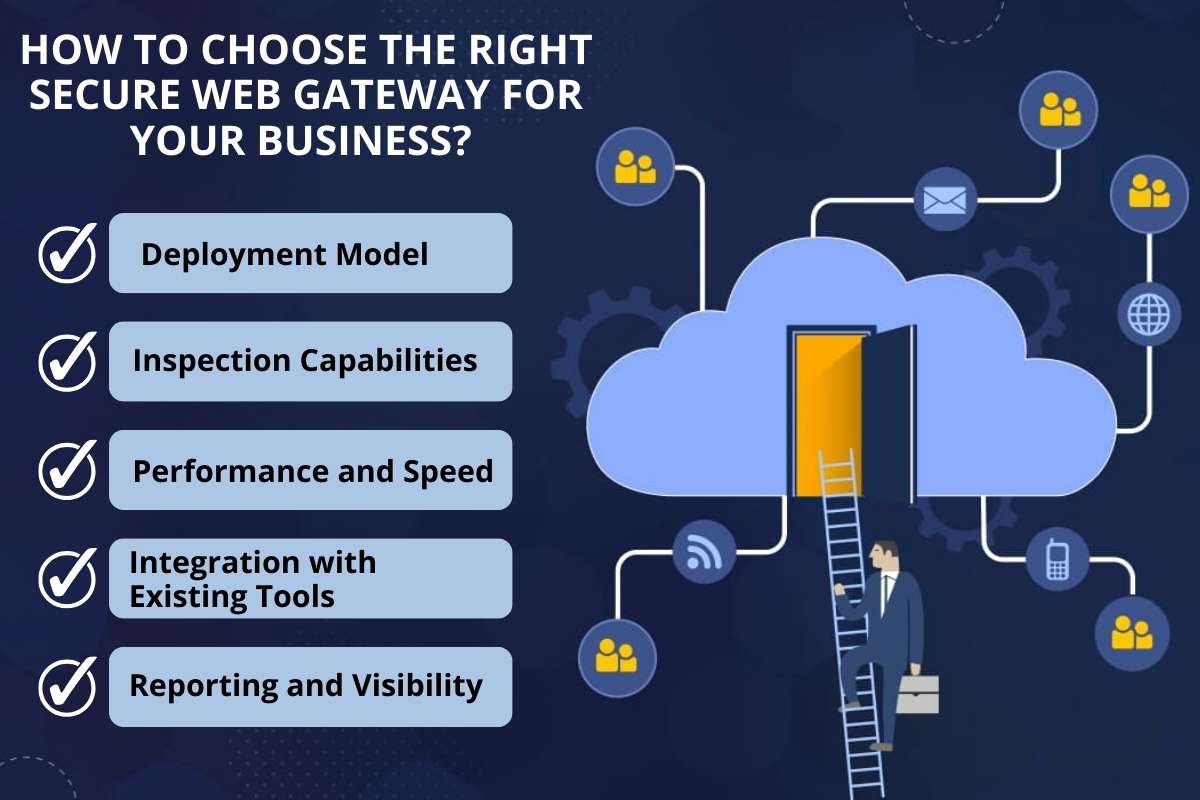
Selecting the right SWG depends on several factors.
1. Deployment Model: Choose between a cloud-based or on-premises gateway. Cloud solutions usually work better for remote or distributed teams because they protect users from any location.
2. Inspection Capabilities: Choose a gateway that supports HTTPS inspection, malware detection, and advanced threat protection. These features help detect hidden threats in encrypted traffic and downloaded files.
3. Performance and Speed: The gateway should process traffic quickly. It must handle large volumes without slowing down web access.
4. Integration with Existing Tools: Make sure the gateway integrates with identity providers, security platforms, and cloud services already used in your environment.
5. Reporting and Visibility: Look for detailed logs, dashboards, and analytics. These tools help security teams monitor web activity and investigate incidents.
Conclusion
The internet now acts as the main gateway to business applications and data. Because of this shift, web traffic has become a common entry point for cyber threats. A secure web gateway provides strong protection against these risks.
More companies now adopt cloud services and remote work models. Because of this change, the role of SWGs continues to grow. Web security gateways combine threat protection, policy enforcement, and compliance support.
Organizations that choose the right solution can reduce risk. They can protect users and strengthen their overall security posture.
FAQs
Q. Do I still need a secure web gateway if I already have a firewall?
Yes. A firewall mainly controls network traffic based on ports and protocols. An SWG analyzes web content, URLs, and downloads in much greater detail. Both tools serve different roles.
Q. Can an internet security gateway slow down internet access?
Modern cloud SWGs minimize latency. Most users notice little or no delay because inspection happens through a distributed cloud infrastructure.
Q. Are SWGs only for large enterprises?
No. Small and mid-size businesses also face web-based threats. Many vendors now offer cloud-based SWG services that scale for smaller organizations.
Q. Can secure web gateways stop phishing attacks?
They can block many phishing attempts by detecting malicious domains and suspicious links. However, organizations should still combine them with email security and user awareness training.