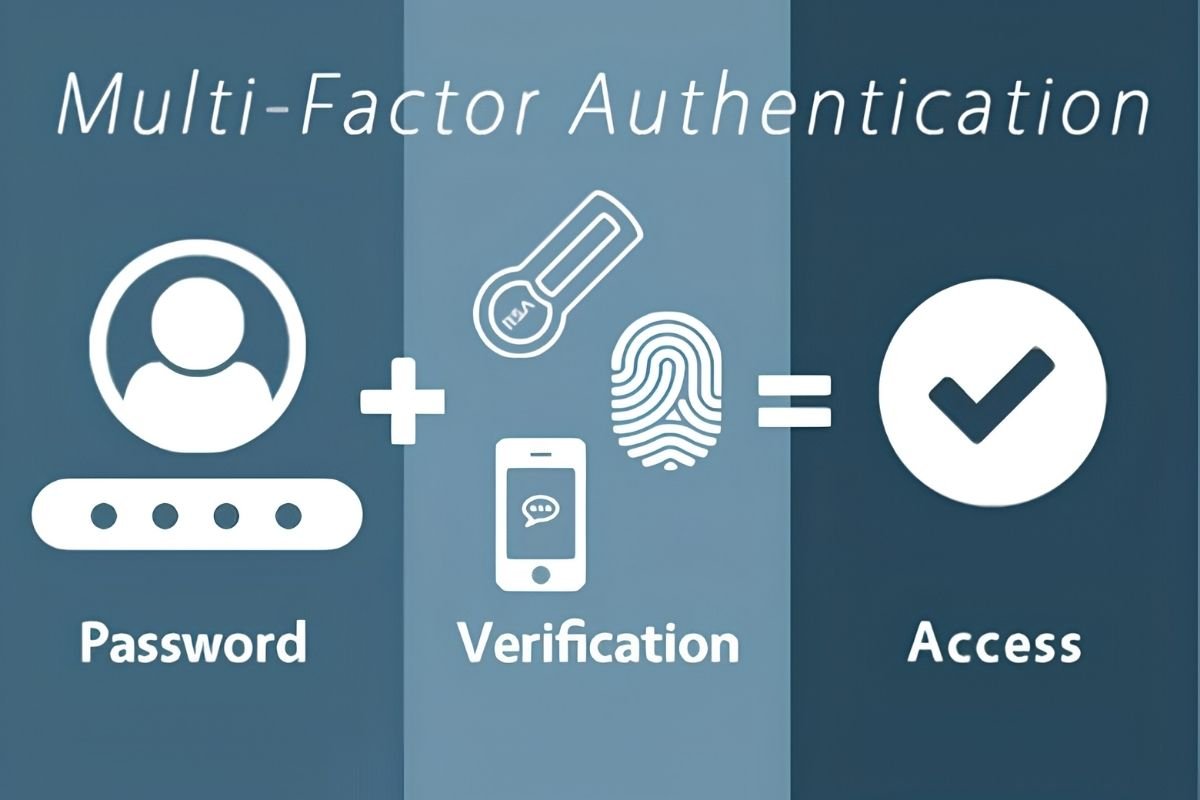
Passwords alone may not be enough to protect your accounts from modern cyber threats. Multi-factor authentication adds another layer of security, making unauthorised access harder even when passwords are compromised.
The benefits of multi-factor authentication include stronger account security, phishing protection, sensitive data safety, and secure remote access. This guide covers MFA benefits, security risks, and practical ways to protect accounts.
What Is Multi-Factor Authentication and How Does It Work?
Multi-factor authentication (MFA) verifies a user’s identity through two or more distinct authentication factors before granting access to an account, application, or system. It adds an extra layer of security when passwords are stolen, guessed, or exposed.
MFA uses three main authentication factors:
- Something you know: A password or PIN.
- Something you have: A registered security key or authentication device.
- Something you are: A biometric characteristic, such as a fingerprint.
Example: An employee may enter a password and approve a sign-in using a registered authenticator. These are separate factors when the implementation meets the relevant authentication requirements.
Here are the 8 Key Benefits of Multi-Factor Authentication
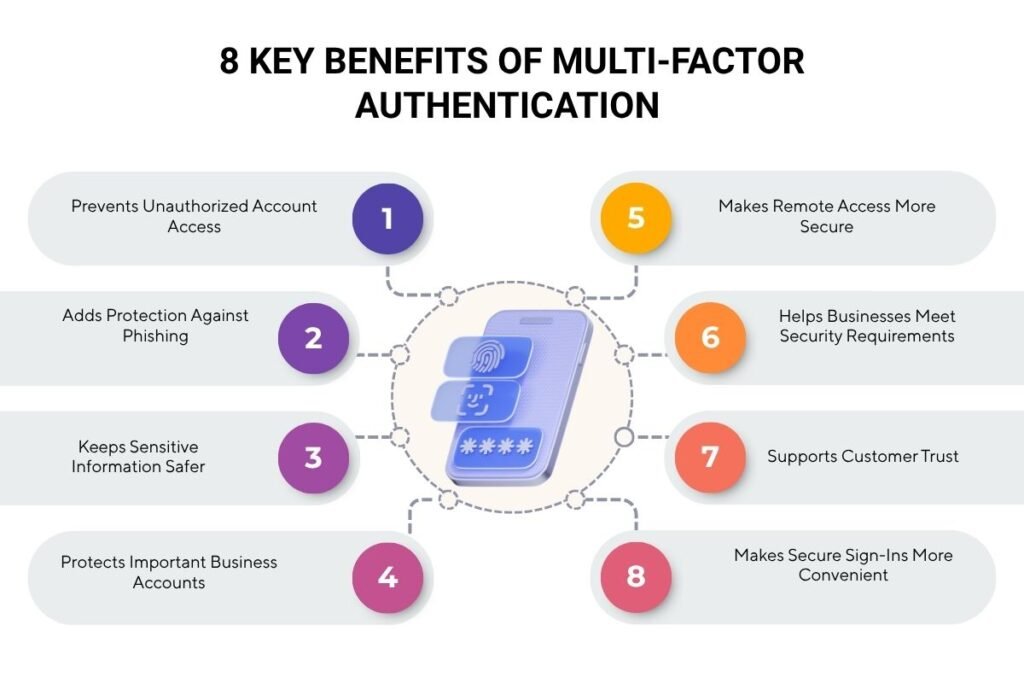
1. Prevents Unauthorized Account Access
MFA adds another verification step, making it harder for attackers to access accounts using stolen or leaked passwords. It helps reduce risks from credential stuffing and other attacks that exploit compromised login details.
Example: If an employee’s password is leaked, an attacker may still be blocked from signing in without the employee’s additional authentication factor.
2. Adds Protection Against Phishing
MFA can reduce the risk of account compromise when users accidentally share their passwords with attackers. While some MFA methods remain vulnerable to real-time phishing, Okta reported a 63% rise in phishing-resistant authenticator adoption, from 8.6% to 14% among workforce users.
Method comparison:
- SMS or authenticator codes: Can still be captured or relayed through real-time phishing.
- Passkeys or security keys: Help prevent phishing by binding authentication to the legitimate service when properly implemented.
3. Keeps Sensitive Information Safer
Email accounts, business files, financial records, and customer information can be valuable targets for attackers. MFA adds another barrier to accessing these resources, helping reduce the risk of data exposure through compromised accounts.
MFA can help protect access to:
- Customer records and business files.
- Personal emails and financial accounts.
- Employee documents and internal reports.
4. Protects Important Business Accounts
Administrator and finance accounts often have access to sensitive systems, payments, or confidential records. MFA makes unauthorized access harder and helps reduce the potential impact of compromised credentials.
Businesses should prioritize MFA for:
- Administrator accounts with system-wide permissions.
- Finance accounts handling payments.
- Accounts managing customer databases.
Implementation tip: Combine MFA with least-privilege access so users only receive the permissions they need.
5. Makes Remote Access More Secure
Employees often access company applications from home, offices, or while travelling, creating multiple access points for businesses to secure. MFA adds another verification layer when employees sign in to remote work tools and cloud platforms.
Example: An employee signing in to a company VPN from home completes an additional verification step before accessing internal resources.
Businesses can apply MFA to:
- VPNs and remote desktops.
- Cloud applications.
- Company email and collaboration tools.
6. Helps Businesses Meet Security Requirements
Some industry standards and security frameworks require or recommend MFA for specific systems and access scenarios. Implementing appropriate authentication controls can help businesses address applicable requirements, although MFA alone does not guarantee compliance.
Example: PCI DSS requires MFA for specified access to the Cardholder Data Environment (CDE), including administrative access. Implementing MFA helps businesses meet applicable authentication requirements, but MFA alone does not guarantee compliance.
Businesses can support implementation by:
- Documenting authentication policies.
- Maintaining access and authentication logs.
- Reviewing applicable security requirements.
7. Supports Customer Trust
Customers want businesses to protect their personal and financial information against unauthorized access. Offering secure authentication options gives customers another way to protect their accounts and demonstrates attention to account security.
Example: If a customer’s password is exposed, MFA can help prevent account takeover by requiring an additional authentication factor. Strong account protection and reliable recovery options can help strengthen customer confidence.
8. Makes Secure Sign-Ins More Convenient
Modern authentication methods, such as passkeys, can simplify sign-ins while providing strong phishing resistance. Single sign-on (SSO) can reduce repetitive logins across connected applications while maintaining appropriate authentication controls.
Simple comparison:
- Without SSO: Employees may need to sign in to several approved applications separately.
- With SSO: Employees can access multiple connected applications through one sign-in, subject to the organization’s authentication policies.
Passkeys can also simplify authentication without requiring users to remember or manually enter a password.
Together, these benefits show why stronger authentication is worth the extra effort. Michael Kaiser, former Executive Director of the National Cyber Security Alliance, highlights this trade-off:
“The benefit of the increased security vastly outweighs the additional effort to implement it.”
How Does MFA Protect Against Modern Cyber Threats?
MFA helps protect business accounts by requiring additional verification beyond passwords, reducing the risk of unauthorised access from stolen credentials. Attackers can target authentication processes and active sessions to bypass some MFA protections.
Real-World Example: Sophos’ 2026 Report Reveals MFA Security Gaps
According to Sophos’ 2026 Active Adversary Report, attackers used malicious PDFs shared through Dropbox to steal Microsoft 365 credentials and authentication tokens. They accessed accounts, sent phishing emails through SharePoint, and created inbox rules to hide their activity. Weak MFA settings, delayed credential resets, and long-lived session tokens enabled repeated attacks. Sophos’ managed detection and response team stopped the incident early, leaving the organisation nearly unscathed.
Sophos found that 67.32% of investigated incident root causes were identity-related, while 59% of incidents involved missing or misconfigured MFA. These findings highlight the importance of strong MFA implementation and identity security.
Understanding MFA Limitations and Potential Security Gaps
- Compatibility issues: Older applications may not support modern MFA methods, requiring upgrades or alternative controls.
- Third-party dependency: Identity provider outages can temporarily disrupt employee access to business applications.
- Inconsistent MFA coverage: Unprotected applications or overlooked accounts can create security gaps across the organization.
Best Practices for Effective MFA Implementation
Effective MFA requires secure authentication methods, safe account recovery, and regular access reviews.
1. Identify Accounts That Need MFA First
Start by identifying applications, users, and accounts that handle sensitive information or have elevated permissions. Prioritize administrator accounts, corporate email, financial systems, VPNs, and cloud management platforms.
Implementation priorities:
- Identify accounts with privileged access.
- Check which applications support MFA.
- Find accounts and systems without MFA enforcement.
- Create a rollout plan based on business risk.
2. Choose the Right MFA Method
Not all MFA methods provide the same level of protection. Businesses should consider phishing resistance, device compatibility, user needs, and recovery options before selecting an authentication method.
| MFA Method | Security Consideration | Best Use |
| FIDO2 Security keys | Strong Phishing Resistance | Privileged and high-risk accounts |
| Passkeys | Strong phishing Resistance when properly implemented | Employee and customer sign-ins |
| Authenticator app with number matching | Helps mitigate push bombing, but remains phishable | Interim option or Suitable general access |
| Authenticator app codes | Can be phished or relayed | Where stronger methods are unavailable |
| SMS codes | Vulnerable to Phishing and SIM swapping | Last-resort option |
Expert recommendation: CISA advises businesses to aim for phishing-resistant MFA. Where it cannot be implemented immediately, organizations can use stronger available alternatives while planning an upgrade.
3. Secure Enrollment and Account Recovery
Verify user identity during MFA enrollment and recovery to prevent unauthorized changes. Secure recovery procedures help maintain account protection.
Implementation tips:
- Verify identity before registering new authenticators.
- Provide secure backup methods and recovery codes.
- Notify users of authenticator changes.
- Revoke lost or old device registrations.
- Monitor recovery-related privileges.
4. Enforce MFA and Integrate Access Controls
Enforce MFA through identity management policies and combine it with role-based access control, least privilege, and SSO where appropriate.
For example, require stronger authentication for administrators, review policy exceptions, and promptly remove access when employees leave or change roles.
5. Train Employees and Test the Rollout
Train employees to recognize legitimate authentication requests and report unexpected prompts. A phased rollout helps identify technical issues before organization-wide enforcement.
Rollout checklist:
- Pilot MFA with a small group.
- Provide enrollment guidance.
- Test login and recovery.
- Communicate enforcement dates.
- Resolve user issues.
6. Monitor MFA Performance and Review Coverage
Regular monitoring helps identify security gaps, suspicious activity, and authentication issues. Review MFA coverage and policy exceptions periodically.
Track these metrics:
- MFA coverage: Percentage of in-scope accounts protected by enforced MFA.
- Phishing-resistant coverage: Percentage of privileged accounts using phishing-resistant methods.
- Authentication failures: Failed or suspicious login trends.
- Recovery incidents: Frequency of recovery requests and security issues.
- Policy exceptions: Accounts or applications excluded from MFA.
Conclusion
Protecting your accounts with MFA is a practical step towards stronger cybersecurity. Individuals can enable it on essential accounts, including email, banking, and work applications. Businesses should prioritise administrator access, review MFA coverage, and adopt phishing-resistant methods wherever possible.
Multi-factor authentication offers several benefits for account security, but its effectiveness depends on strong authentication methods, secure recovery processes, and regular monitoring.
FAQs
1. What is the difference between two-factor authentication and multi-factor authentication?
Two-factor authentication requires exactly two distinct authentication factors, while multi-factor authentication requires two or more.
2. What happens if I lose my phone or authentication device?
You can regain access through a secure backup method or your account provider’s recovery process.
3. Can I use multi-factor authentication without a smartphone?
Yes, compatible hardware security keys and other supported authentication methods can work without a smartphone.
4. Are the benefits of multi-factor authentication the same for every account?
No, the benefits vary based on account sensitivity, authentication methods, and security risks.