We all know the classic scene: a detective uses a unique fingerprint to solve a crime. That same power of identification now protects you online. Think of it: every device and browser you use leaves behind a distinct digital signature. Experts use these unique patterns to immediately tell a real visitor from a threat. This brings us to a key question: What exactly does fingerprinting in cybersecurity entail?
You never browse anonymously. Every click and connection leaves a small, traceable data trail. Security systems constantly collect these tiny details about your machine and how it connects. They quickly piece them together to build your unique online profile. This essential ability to instantly recognize you is the front line in defending against fraud. Ready to uncover how we harness your digital markers to build a powerful defense system?
What Makes Fingerprints the Gold Standard of Identification?
Colin Beavan, in his book ‘Fingerprints – The origins of crime detection and the murder case that launched forensic science’ notes, “A fingerprint expert can tell apart the marks of two digits more easily than he can differentiate two people’s faces.”
But how so? You may wonder. To understand this, we must understand how fingerprinting works.
Think of fingerprinting in cybersecurity as the special way we capture the one-of-a-kind lines on your fingertips. These lines, also called friction ridges, form patterns that are unique to you. The lines on your finger don’t exist anywhere else.
These patterns appear at your birth, and they never change, even as you get older. And this makes them a perfect form of personal ID. Police and forensic experts use these unique marks to solve crimes. They match prints left at a scene to those taken from a suspect. They look for specific features, such as where a line ends or where it splits into two.
Fingerprinting in Cybersecurity: A Breakdown of Methods and Digital Types
There are three main types of fingerprinting in cybersecurity categories. These categories are loops (60-65% of prints), whorls (30-35%), and arches (5%). Loops feature ridges that enter and exit from the same side, forming a U-shape. Whorls display circular or spiral ridge flows around a central point. Arches show ridges rising from one side and flowing to the other without recurving.
But all this leads to the question, what does fingerprinting have to do with cybersecurity? As unrelated as it may sound, fingerprinting is a crucial player in cybersecurity.
Now there are three methodological types of fingerprinting in cybersecurity. They are classified by interaction level and OSI layers.
Here’s how they work:
| Method | How does it work? | Key Examples |
| Passive | Collects natural traffic without interacting with the target. | TCP/IP stack traits, HTTP headers |
| Active | Sends probes or scripts to trigger identifiable responses. | Canvas rendering, WebGL tests, Nmap scans |
| Semi-Passive | Waits for the target to initiate contact, then responds to gather more data. | Hybrid connection-based fingerprinting |
What is Digital Fingerprinting? Three Types of Digital Fingerprints and Their Role in Cybersecurity
To understand fingerprinting in cybersecurity, we must try to learn about digital fingerprinting. A digital fingerprint is a unique identifier generated from characteristics of a device, browser, software, or file, such as hardware specs, OS version, screen resolution, installed fonts, and network settings.
Now there are three types of digital fingerprints. These types are Device/Browser Fingerprint, File Fingerprint, and Content Fingerprint.
Here’s how it works:
- Device/Browser Fingerprint: Combines data such as MAC address, browser plugins, time zone, and IP address to track users online without cookies.
- File Fingerprint: A hash (e.g., MD5 or SHA) uniquely identifying digital content like documents or media to detect changes or leaks.
- Content Fingerprint: Algorithmic signature for copyrighted media to enable tracking, DRM, and piracy prevention across platforms.
How does Device Fingerprinting work?
We have now heard the term “device fingerprinting in cybersecurity” quite a few times. Here’s how it works:
1. Data Collection
The system gathers data points, such as the operating system type and version, browser version, screen resolution, installed fonts and plugins, language, timezone, hardware specs like GPU and CPU info, battery status, network configurations, and behavioral patterns.
2. Aggregation and Profiling
The collected data points are combined into a comprehensive dataset representing the device’s unique configuration. This data is processed and hashed using cryptographic algorithms, like the SHA-256, to create a tamper-resistant fingerprint string.
3. Storage and Comparison
The fingerprint hash is stored in a secure database. Upon subsequent interactions, new fingerprints are generated and compared against existing entries to identify returning devices or flag anomalies, helping detect fraud or unauthorized access.
4. Usage in Real-Time Decisions
The fingerprinting in cybersecurity systems integrates with fraud detection or security platforms to evaluate risk, block suspicious activity, or enforce adaptive authentication based on device trustworthiness.
How does File Fingerprinting work?
Now that we know how device fingerprinting in cybersecurity works, let’s take a look at file fingerprinting. Here is all you need to know:
1. Content Scanning:
The algorithm processes the entire file byte-by-byte, applying mathematical transformations (e.g., modular arithmetic, bit shifting) to produce a compact hash, regardless of file size.
2. Hash Generation:
Even a single bit change in the file yields a drastically different hash (avalanche effect), ensuring uniqueness with negligible collision risk (e.g., <10^{-20} for 64+ bit hashes).
3. Storage and Matching:
Hashes are stored in databases; new file hashes are compared for exact matches to verify integrity, detect duplicates, or identify leaks during network scans.
How does Content Fingerprinting work?

And now, we will talk about the last type of fingerprinting in cybersecurity, Content fingerprinting. Here’s how it works:
1. Content Analysis:
Extracts perceptual features from media such as audio spectrograms, video keyframes, or image pixel patterns, ignoring minor edits like compression or cropping.
2. Feature Extraction:
Converts raw content into robust descriptors (e.g., landmarks in audio waveforms or color histograms in images) using algorithms like perceptual hashing.
3. Hash Generation:
Applies cryptographic or fuzzy hashing (e.g., pHash, DCT-based) to create a fixed-length fingerprint tolerant to transformations. It ensures small changes yield similar hashes.
4. Fingerprint Matching:
Compares query fingerprints against a database using similarity metrics (e.g., Hamming distance < threshold flags matches), enabling detection even in altered copies.
5. Applications Deployment:
Scans platforms for matches to enforce DRM, detect piracy, or verify authenticity in real-time across uploads or streams.
Real-World Applications of Fingerprinting in Cybersecurity
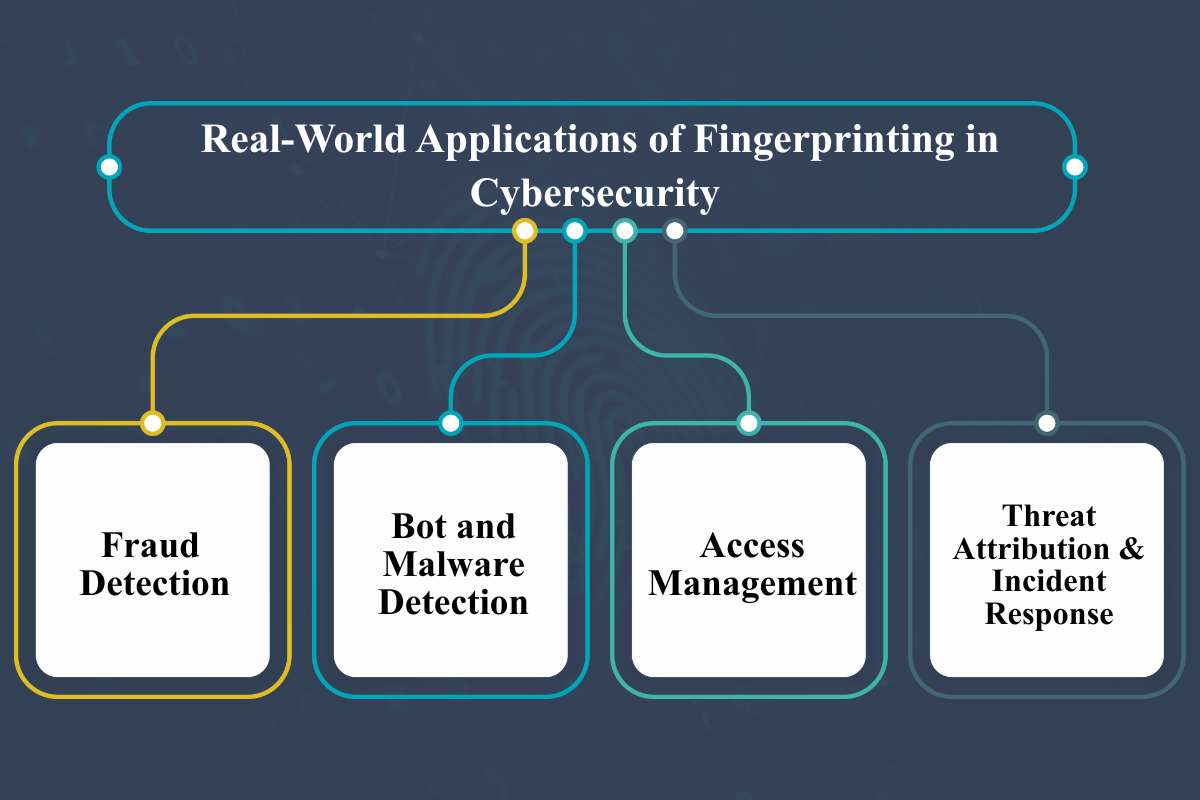
Now that we know the types and meaning of fingerprinting in cybersecurity, let’s take a look at its applications.
Fingerprinting in cybersecurity identifies devices, users, or software by analyzing unique traits like OS versions, browser configurations, IP addresses, screen resolution, and network behaviors, enabling passive tracking without credentials.
Here’s what the key applications of fingerprinting in cybersecurity are:
1. Fraud Detection:
Imagine a bank’s security system knowing your phone. Fraud detection uses digital fingerprinting to create a unique profile of your device. It combines details like your computer’s setup, the type of browser you use, and even how you move your mouse or type.
If a hacker tries to log into your account, the system compares their device’s “fingerprint” with the one it remembers for you. A mismatch instantly triggers a security check, like sending a code to your phone, or blocks the attempt. This quick, invisible check stops thieves from taking over accounts. The 2021 Financial Trend Analysis report by the U.S. Financial Crimes Enforcement Network (FinCEN) analyzes approximately 3.8 million Bank Secrecy Act (BSA) reports related to identity-related suspicious activities.
2. Bot and Malware Detection:
Have you ever seen an online shopping item sell out instantly? Sometimes, this is done by automated bots. Bot and malware detection uses fingerprinting to spot this robotic traffic.
A real person uses a browser that has small, natural variations. A bot, however, leaves a perfectly uniform, or identical, signature, like having the same canvas rendering output or a suspicious time zone. Security systems use these tell-tale signs to score the session. If the score signals a machine, the traffic is blocked. It prevents malicious programs from stealing user details, hoarding products, or rigging prices on e-commerce sites.
3. Access Management:
Access management is an invisible guard that checks you constantly while you’re working. It uses your device’s fingerprint for continuous, hidden identification.
If your device suddenly starts connecting from a different country, or if important software disappears, the fingerprint changes. This change tells the system the risk level has increased. It might then immediately restrict your access, for example, by forcing you to connect through a special, secure private network (VPN). This helps companies protect their sensitive information from threats, even from employees who might accidentally do something risky.
4. Threat Attribution and Incident Response:
When a major cyberattack takes place, Threat attribution is done by using fingerprinting in the same way that a detective does with evidence.
Cybersecurity experts collect the unique digital signatures left by the attacker’s tools. It can be the specific way their software talks over the network. They use this to build a catalog of criminals. If they see a new attack that has the same unique signatures, they can say, “This looks like the work of the same group we saw last year.” This helps them predict future attacks and proactively hunt down threats by spotting any device activity that looks different from the normal, safe baseline.
The Risks and Privacy Concerns of Fingerprinting
Fingerprinting in cybersecurity poses real problems. It lets people track you constantly without your permission. This tracking happens even when you use a private browser window. Attackers use this method to find weaknesses in your system before launching an attack.
Minor software updates can cause problems. The system might block you, a legitimate user, by mistake. On the other hand, criminals can fake a fingerprint to sneak past security undetected and commit fraud.
This tracking bypasses cookie-blocking tools. It creates detailed surveillance profiles of your online life. Companies sell these profiles for targeted ads. This non-stop data collection breaks strict privacy rules like GDPR, as it violates your right to choose who collects your information. Simply put, fingerprinting in cybersecurity allows for constant, hidden data collection without your consent.
You can take steps to limit tracking. Use privacy tools built into browsers like Firefox or Tor. Install browser extensions like uBlock Origin to block known trackers. You can also use tools that change your digital signature, such as rotating your time zone or browser type, to confuse trackers.
For companies, the solution is strict rules. They must get clear consent and only collect the minimum data necessary for security, like stopping fraud.
Conclusion
We’ve seen that fingerprinting in cybersecurity is a powerful concept. It moves from physical crime scenes to your digital life. Your device leaves a unique signature of data points. Security systems use this signature to build your profile. This is crucial for identification and preventing online harm. Understanding this process shows you how safety works behind the scenes. The applications of this technology are vast, from blocking automated bots to defending your bank account.
The debate around fingerprinting in cybersecurity technology is important. It offers strong defenses against fraud and major cyber threats. However, it also raises real concerns about constant tracking and privacy. We must balance this powerful security tool with our right to control personal data. Moving forward, both users and organizations must prioritize informed consent and transparency. This ensures that fingerprinting in cybersecurity remains a tool for safety, not for hidden surveillance.
FAQs
1. How is digital fingerprinting different from a physical fingerprint?
A physical fingerprint uses unique skin ridges for identification. Digital fingerprinting uses a unique combination of data from your device, such as your browser and settings, to create an identifier.
2. Can websites track me even if I use Incognito or Private mode?
Yes, they can. Incognito mode prevents your browser from storing local history and cookies. However, it does not hide your device’s unique digital signature, allowing persistent tracking.
3. Can I completely block digital fingerprinting?
You cannot completely block it, but you can limit its effectiveness. Using privacy browsers (like Tor) and extensions (like uBlock Origin) helps to change or noise up your unique digital signals.